
Browser Fingerprinting and Visitor ID: Tracking Repeat Offenders
How browser fingerprinting and Visitor ID let a store recognize the same bad actor even after they clear cookies or switch accounts and how to use it for fraud prevention without crossing privacy lines.
Here's a frustrating pattern every store owner eventually hits: you block a fraudster, and ten minutes later they're back. New email, new account, cookies cleared, maybe even a fresh card but it's the same person, doing the same thing. Blocking an account or an email barely slows them down, because those are trivial to change.
This is the exact problem browser fingerprinting and a Visitor ID are built to solve. They let your store recognize the device behind the orders, not just the account in front of them so a repeat offender stays recognized even when they swap every other detail. After 15+ years in fraud prevention, I consider this one of the most quietly powerful tools a store can have. This guide explains how it works in plain English, why it beats cookies for catching repeat fraud, and how to use it responsibly.
The Core Problem: Identifiers Are Easy to Change
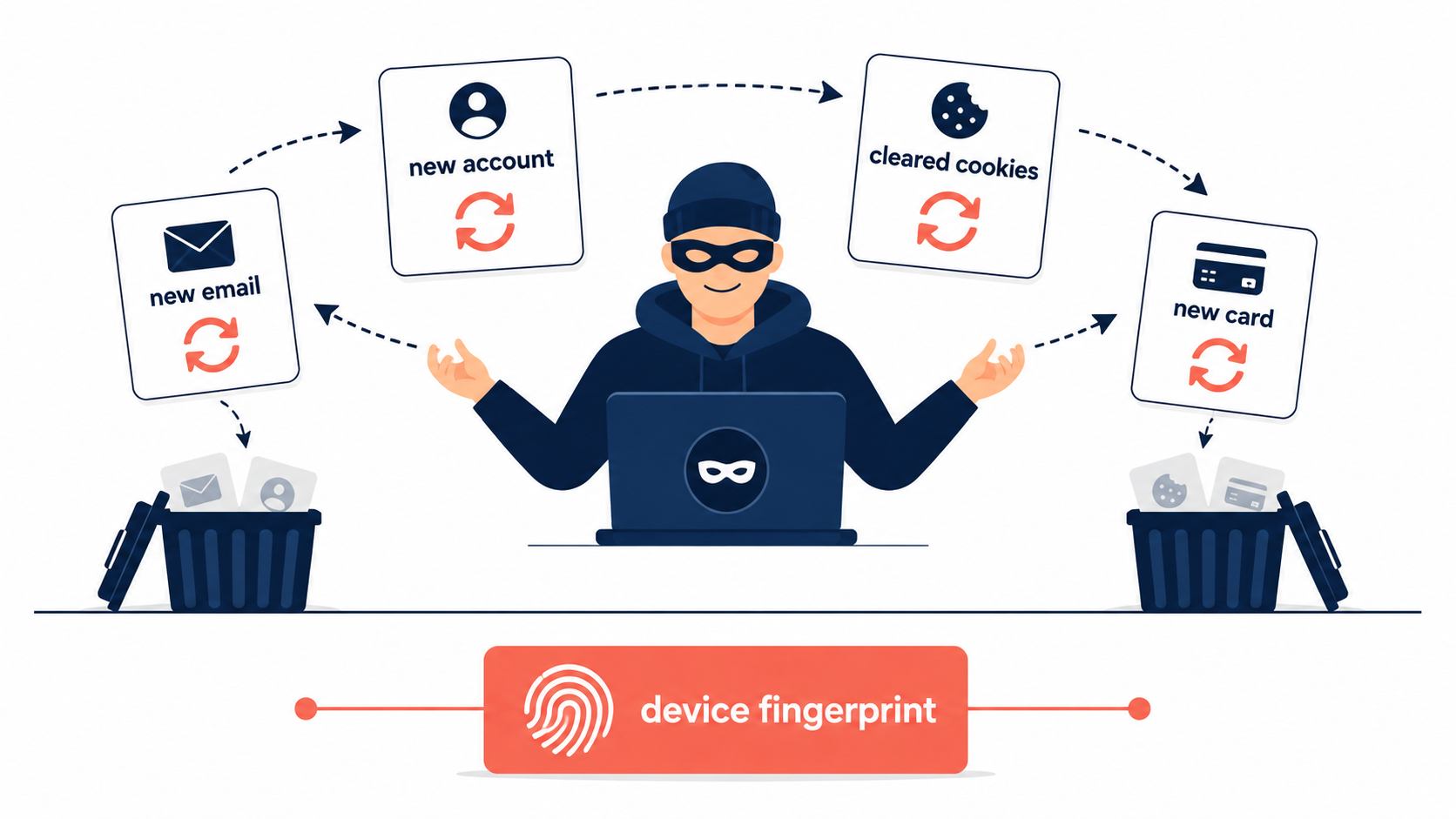
Most of the things a store uses to identify a customer are disposable. An email takes seconds to create. An account is free. Cookies clear with one click or vanish in incognito mode. A determined fraudster cycles through all of them.
So the question fraud prevention has to answer is: how do you recognize the same actor when everything they control can be changed? The answer is to identify something they can't easily change the technical signature of the device and browser they're using. That signature is the basis of fingerprinting.
What Is Browser Fingerprinting?
Browser fingerprinting builds a digital signature of a visitor by combining dozens of small technical details their browser exposes automatically: screen resolution, operating system, browser version, installed fonts, language settings, time zone, graphics hardware behavior, and more. No single detail identifies anyone millions of people share any one of them but the combination of dozens of attributes is distinctive enough to recognize a particular device with surprising reliability.
Device fingerprinting is the broader cousin: it includes the browser-level signals plus hardware traits, system settings, and increasingly, behavioral signals mouse-movement patterns, typing rhythm, scroll speed. The more signals combined, the more confident the match.
The result is a stable identifier call it a Visitor ID that sticks to the device rather than the account.
Why It Beats Cookies for Catching Repeat Fraud
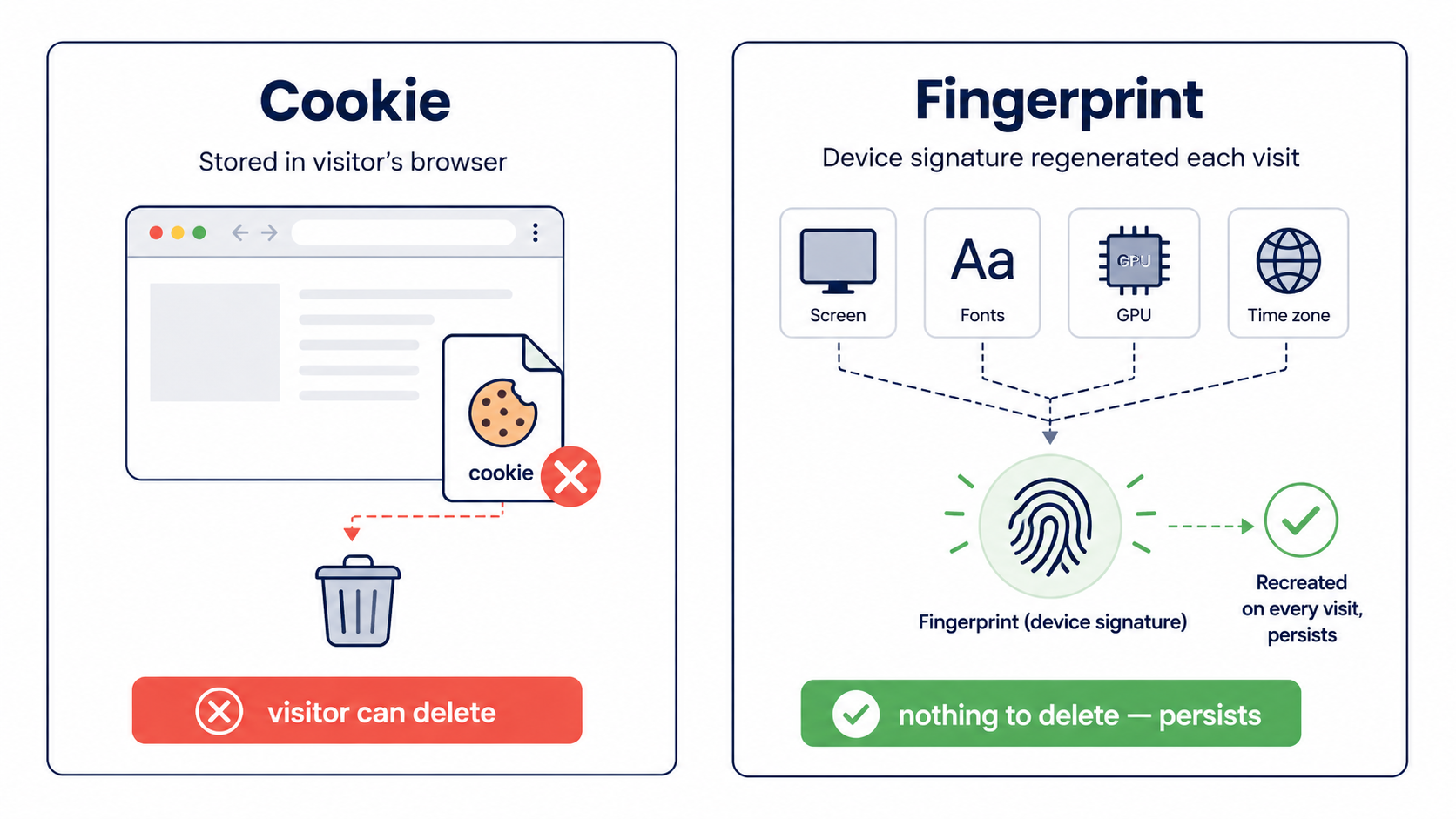
Cookies and fingerprints sound similar, but they behave very differently, and the difference is the whole point.
A cookie is a small file your store stores on the visitor's browser. The visitor controls it completely they can delete it, block it, or open a private window where it never persists. For tracking a willing customer's preferences, cookies are fine. For catching someone actively trying not to be recognized, they're useless.
A fingerprint is generated from traits the browser keeps exposing every time it connects. There's nothing stored on the visitor's side to delete. So even when a fraudster clears cookies, opens an incognito session, or logs into a brand-new account, the same combination of device signals often re-generates the same Visitor ID and your store recognizes them.
That persistence is exactly what makes fingerprinting effective against the behaviors that matter most:
- Repeat offenders who return after being blocked under a new account.
- Multiple accounts from one device a classic signal of fraud, promo abuse, or fake registrations.
- Account takeover, where a login suddenly comes from a device that's never been seen on that account before.
By identifying the device instead of the account, you catch the actor even when they change everything else.
How Stores Actually Use a Visitor ID
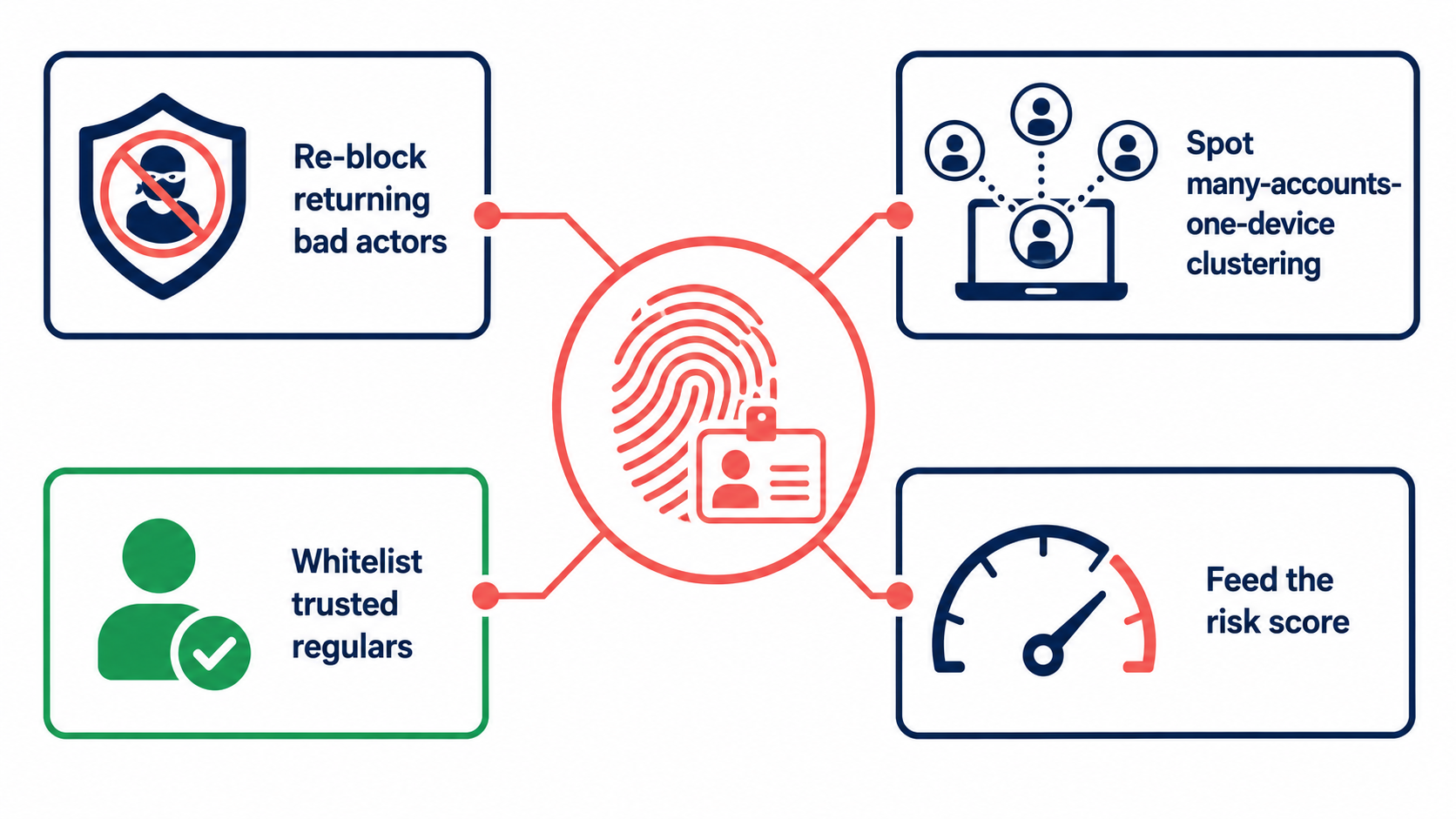
In practice, a Visitor ID turns into a few concrete fraud-fighting moves:
Recognize and re-block returning bad actors. Once a device is associated with confirmed fraud, that Visitor ID can be flagged so the same device is caught on its next visit no matter what account or email it uses.
Spot suspicious clustering. Many accounts, orders, or failed payment attempts tied to a single Visitor ID is a strong anomaly signal, often pointing to card testing or organized abuse.
Whitelist your real regulars. The flip side matters too. A recognized, trusted device can be whitelisted so a loyal customer who occasionally trips a filter (traveling, on a VPN) isn't wrongly blocked. Fingerprinting protects good customers as much as it catches bad ones.
Feed the risk score. A Visitor ID with a clean history lowers risk; one tied to prior abuse raises it. Like every other signal, it works best as an input to an overall score rather than a standalone verdict.
The Honest Limits
Fingerprinting is powerful, but it isn't magic, and I'd be doing you a disservice to oversell it.
Fingerprints can drift over time a browser update, a new device, or changed settings can alter some attributes, so a match is a strong probability, not a certainty. Sophisticated fraudsters use anti-detect browsers specifically designed to randomize or spoof their fingerprint. And because no single signal is perfect, fingerprinting should always work alongside IP analysis, payment data, and behavioral signals not replace them.
Treat a Visitor ID as one of your most reliable signals, but still one signal among several.
The Privacy Question: Doing This Responsibly
Any time you're identifying devices, privacy has to be front of mind and this is an area where being careful is both right and good for the business.
The key principle: use anonymized identifiers, not personal data. A Visitor ID built for fraud prevention identifies a device signature, not a named individual it doesn't need to know who someone is, only whether this device has misbehaved before. That distinction matters legally and ethically.
On the regulatory side, GDPR and similar laws generally require explicit consent to use fingerprinting for advertising or marketing. But using it for security and fraud prevention is commonly defensible under the "legitimate interest" basis protecting your store and other customers from fraud is a legitimate purpose. As of 2026 the regulatory picture is still settling, and the consensus among privacy practitioners is that a defensible posture combines minimized data collection, clear purpose limitation (fraud prevention only), and sensible retention rather than hoarding signals indefinitely. The responsible build and the maximally invasive build are not the same system aim for the former.
A practical responsible-use checklist:
- Identify the device, not the person anonymized Visitor ID, no PII.
- Use the data only for fraud prevention, not repurposed for marketing.
- Don't collect data on anyone you have reason to believe is a minor.
- Be transparent in your privacy policy about security-purpose processing.
Where a Tool Fits
You can't compute a fingerprint by hand, so this capability lives in your security tooling. A store-security app like Browsify App generates a Visitor ID for each visitor and lets you use it to recognize and block repeat offenders, spot one-device-many-accounts clustering, and whitelist trusted regulars all built on anonymized identifiers (Visitor ID, IP) rather than personal data, in line with a GDPR/CCPA-aware, fraud-prevention-only approach. The aim isn't to surveil shoppers; it's to recognize the device of someone who's already proven to be a problem. (For how the Visitor ID combines with IP and other signals into a single verdict, see Understanding Risk Scores: How Fraud Detection Actually Works.)
Frequently Asked Questions
Does fingerprinting still work if a fraudster clears their cookies? Yes that's its main advantage over cookies. A fingerprint is generated from device traits the browser re-exposes each visit, so clearing cookies or using incognito often regenerates the same Visitor ID.
Is a Visitor ID the same as knowing who someone is? No. A fraud-prevention Visitor ID identifies a device signature, not a named person. It's an anonymized identifier it tells you "this device has misbehaved before," not who owns it.
Is browser fingerprinting legal for fraud prevention? Generally yes, when used for security. GDPR and similar laws typically require consent for marketing fingerprinting, but fraud prevention is commonly defensible under "legitimate interest." Use anonymized data, limit it to security, and disclose it in your privacy policy.
Can fraudsters beat fingerprinting? Sophisticated ones use anti-detect browsers to spoof or randomize their fingerprint, and fingerprints can drift naturally over time. That's why it should be one signal among several, not your only defense.
How is this different from a cookie? A cookie is stored on the visitor's browser and can be deleted by them; a fingerprint is generated from device characteristics with nothing stored to delete making it far more persistent against someone actively trying to avoid recognition.
Final Thoughts
The reason repeat fraud is so maddening is that the identifiers most stores rely on emails, accounts, cookies are exactly the things a fraudster can change in seconds. Browser fingerprinting and a Visitor ID flip that around: they recognize the device behind the behavior, so a blocked bad actor stays recognized even after they swap everything else.
Used well, it's one of the most effective ways to stop the same person from hitting your store over and over and, just as importantly, to recognize and protect your genuine regulars. Build it on anonymized identifiers, keep it strictly for fraud prevention, combine it with your other signals, and you get the upside without crossing privacy lines.
This article is for general educational purposes and reflects common e-commerce security practices; it isn't legal or financial advice. Privacy regulations around fingerprinting are evolving confirm your obligations under GDPR, CCPA, and local law, and consult qualified counsel for your specific situation.
Related Guides
- Visitor ID & Browser Fingerprinting How Visitor ID works and why it's more reliable than IP blocking.
- Stop Fake Orders on Shopify The complete guide to identifying and blocking fraudulent orders.
- Fraud Risk Scores How Visitor ID feeds into the overall risk verdict.
- Automatic Fraud Blocking Set up rules that re-block repeat offenders 24/7 without manual review.