
How to Automate Fraud Prevention on Shopify (Without Blocking Real Customers)
Reviewing every flagged order by hand doesn't scale. Learn how to automate fraud prevention on Shopify with Flow and dedicated tools without wrongly blocking legitimate customers.
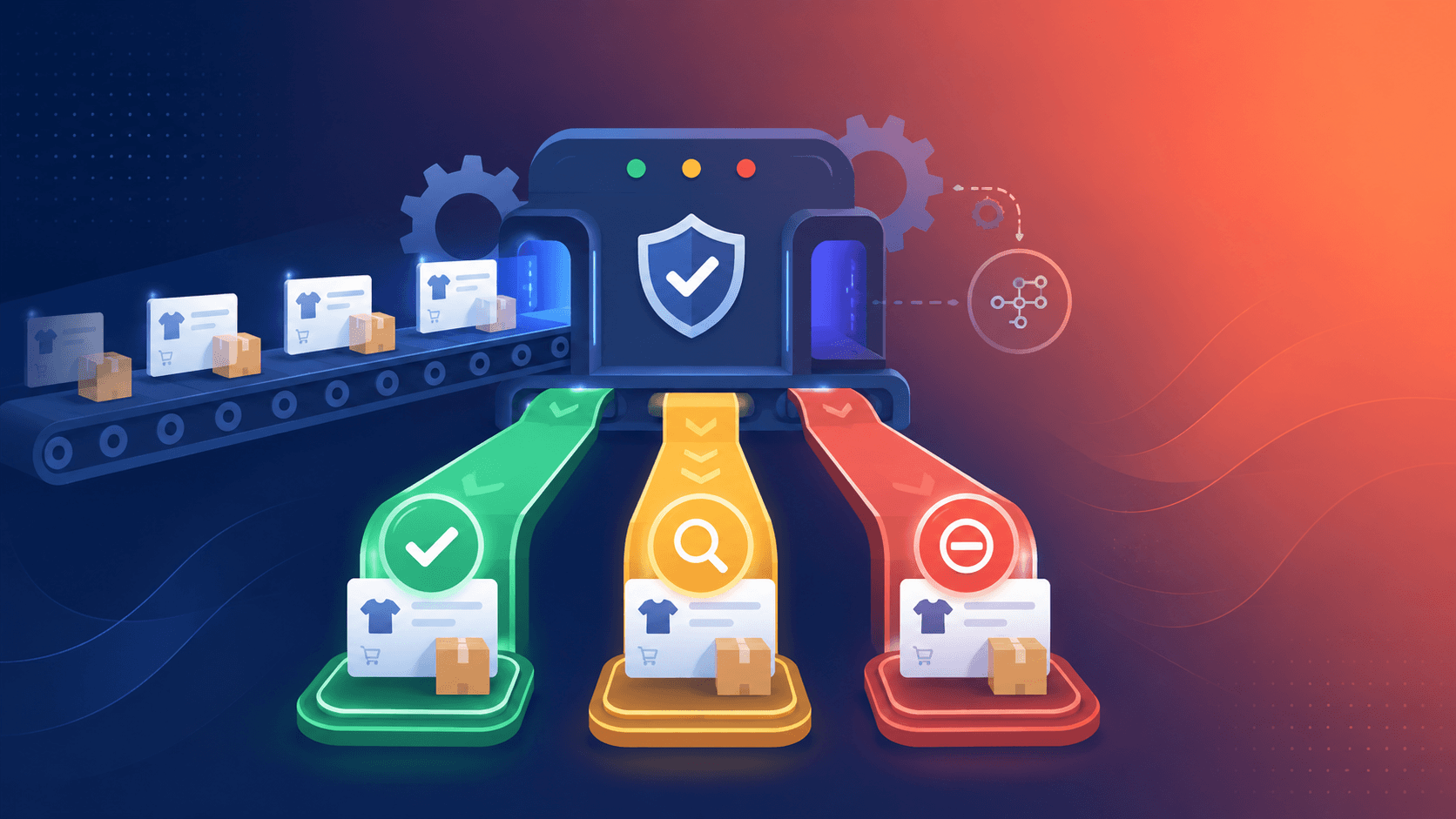
There's a moment every growing Shopify store hits: the volume of orders outpaces your ability to review them by hand. At 20 orders a day, manually checking flagged ones is annoying but doable. At 500 a day, it's a full-time job and one mistake at 2 a.m. becomes a chargeback by morning. At scale, manual review teams handle thousands of orders a day, and the operational cost of all that human checking often exceeds the direct fraud losses themselves.
Automation is the answer but it's also where merchants get nervous, and rightly so. Automate carelessly and you start auto-cancelling legitimate customers, turning a fraud tool into a revenue leak. The goal isn't to automate everything; it's to automate the clear-cut decisions so your human attention goes only to the genuine edge cases.
This guide shows you how to do exactly that on Shopify. (For the bigger picture, see our complete guide to Shopify fraud prevention, and for tuning the rules behind automation, Best Practices for Setting Fraud Thresholds.)
Why Manual Review Doesn't Scale
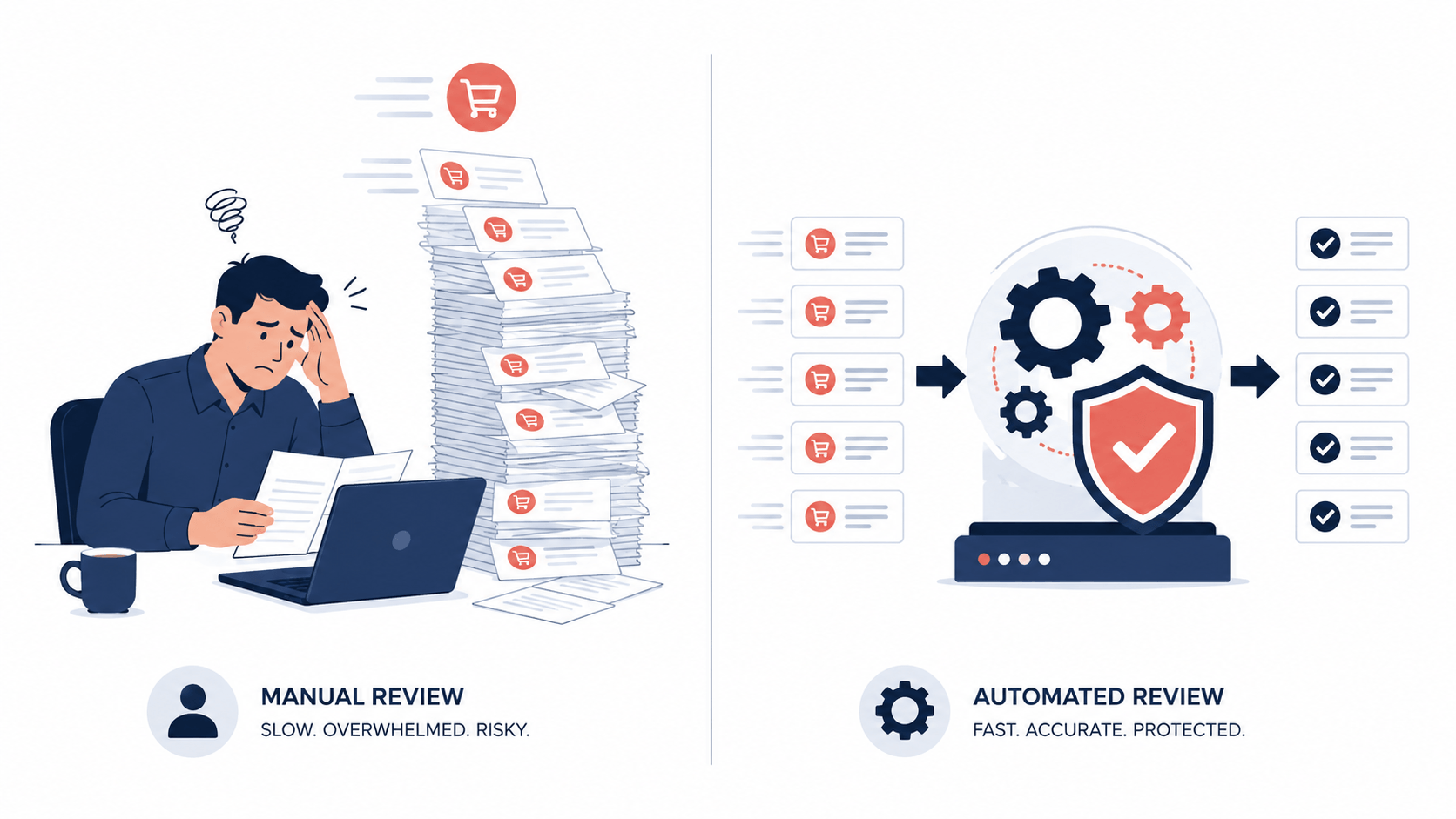
Before the how, it's worth being honest about why automation isn't optional past a certain size:
- Volume outpaces attention. Order growth is the goal, but every order is a potential review. Human review simply doesn't scale linearly with sales.
- Humans are slow and inconsistent. Reviewing hundreds of orders is exactly the kind of repetitive, computational task where automation reduces human error. People get tired, distracted, and apply rules unevenly.
- Fraud doesn't keep business hours. Card-testing bots and fraudulent orders arrive overnight, on weekends, during your busiest sale. Automation watches the store when you can't.
- The cost compounds. Every hour spent manually reviewing is an hour not spent growing and the operational expense adds up fast.
The merchants who scale cleanly are the ones who let a system handle the obvious decisions and reserve human judgment for the ambiguous middle.
Shopify Flow: Your Built-In Automation Engine
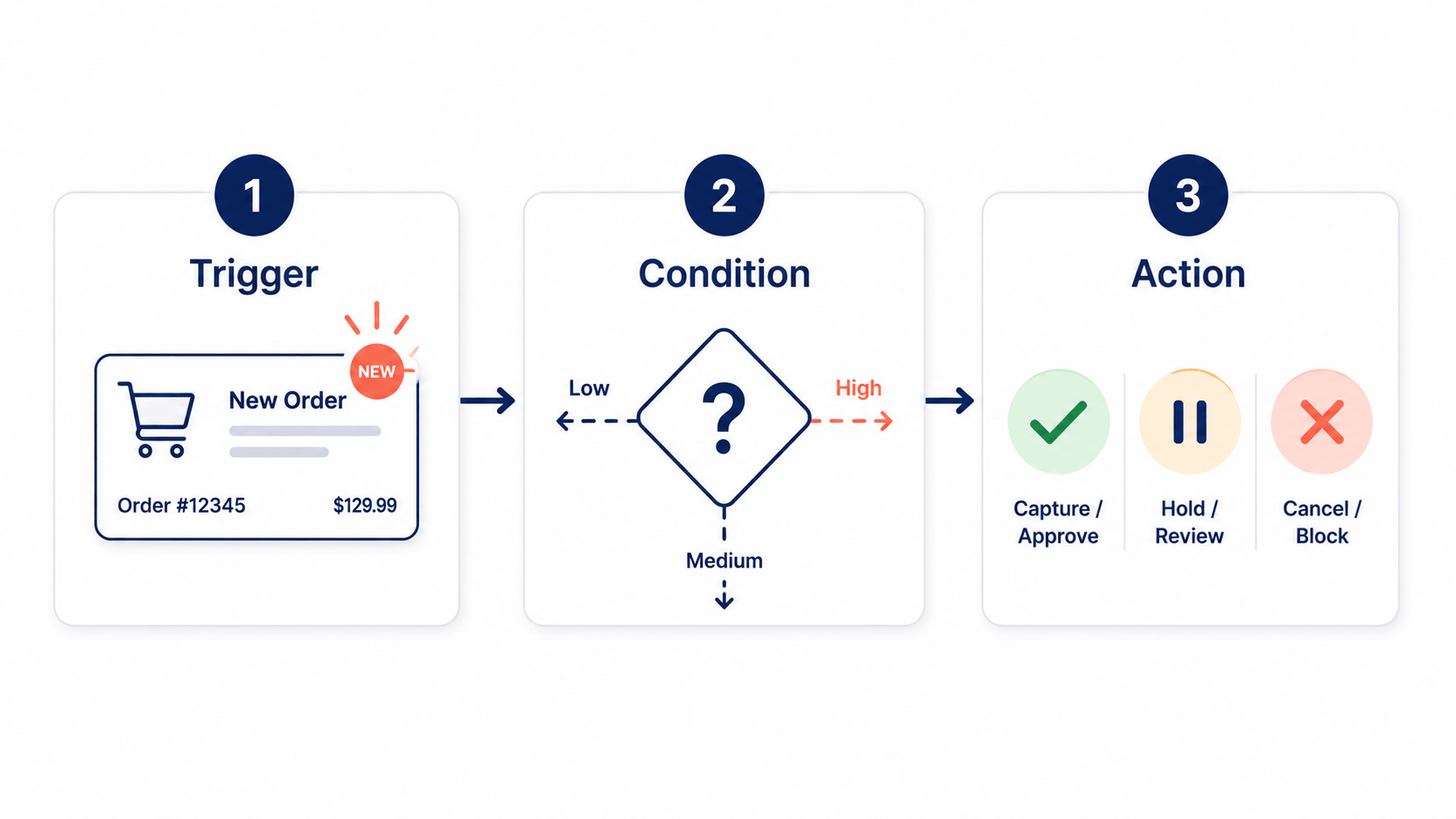
Shopify's native automation tool is Shopify Flow, a free, no-code, drag-and-drop workflow builder. Every workflow follows the same simple logic: a trigger (an event), a condition (a check), and an action (what happens). Merchants report it saves meaningful hours each week across operations.
For fraud, Flow lets you automatically flag, hold, or cancel orders matching high-risk patterns without reviewing each one by hand. There are a few ready-made templates worth knowing:
- Capture payment if order is not high fraud risk auto-captures payment for low- and medium-risk orders while withholding capture on high-risk ones for your review.
- Cancel and restock high-risk orders cancels high-risk orders, returns items to inventory, and notifies the customer.
- Cancel and tag orders from known bad email addresses interrupts automated fraud by blocking emails tied to past fraudulent orders.
- Restrict orders to five a day per customer throttles the rapid-fire ordering typical of bots.
- Notify your team of a chargeback sends an internal alert when a dispute arrives.
The one setup detail that trips people up
Two technical points matter enormously, and missing them breaks your automation:
First, use the "Order risk analyzed" trigger, not "Order created." Fraud analysis takes a moment to process after an order is placed. If your workflow triggers on creation, it runs before the risk verdict exists and acts on nothing.
Second, if your workflow decides whether to capture payment, you must set payment capture to manual in your settings. These workflows simply don't function with automatic capture turned on.
The Smartest Automation Pattern: Tier, Don't Nuke
Here's the strategy that separates safe automation from the kind that quietly kills sales. Don't build a single rule that auto-cancels everything risky. Instead, tier your response by risk level a pattern Shopify Flow is purpose-built for:
- Low and medium risk → auto-approve / auto-capture. Keep checkout frictionless for the overwhelming majority of genuine customers. This is where automation saves the most time at zero customer cost.
- High risk → hold and route for review. Rather than auto-cancelling, withhold payment capture and siphon the order into a review queue. You still catch the fraud, but you give a potentially legitimate customer a path to verification instead of a slammed door.
- Confirmed-bad signals → auto-cancel. Reserve fully automated cancellation for unambiguous cases emails tied to past fraud, or clear card-testing patterns.
This tiered approach minimizes friction for legitimate repeat buyers while siphoning genuinely suspicious orders into review the best of both worlds. The blunt "auto-cancel anything flagged" approach, by contrast, guarantees you'll destroy good orders, because high risk is a probability, not a certainty.
The Limits of Built-In Automation
Shopify Flow is powerful, but it's important to understand where it stops because these gaps are exactly why automated fraud still slips through.
It's reactive, not preventive. Flow acts after an order is created and analyzed. It can cancel a fraudulent order, but the order already happened inventory was touched, and for card testing, the damage of the validation attempt is already done.
It works on orders, not traffic. Flow can't stop a bot from hammering your checkout in the first place. By the time it runs, the fraudster is already in.
Risk verdicts are a black box. Flow acts on Shopify's high/medium/low recommendation, which you can't tune or fully see into. If you want to automate on why an order is risky, the built-in signals are limited.
Determined fraudsters adapt. As Shopify itself notes, simple rules like blocking known bad emails are easy for fraudsters to work around they just use a new email.
This is why mature stores layer a dedicated tool in front of Flow: stop the obvious bad traffic before checkout, then let Flow handle order-level automation for what gets through.
Automating Prevention Before Checkout
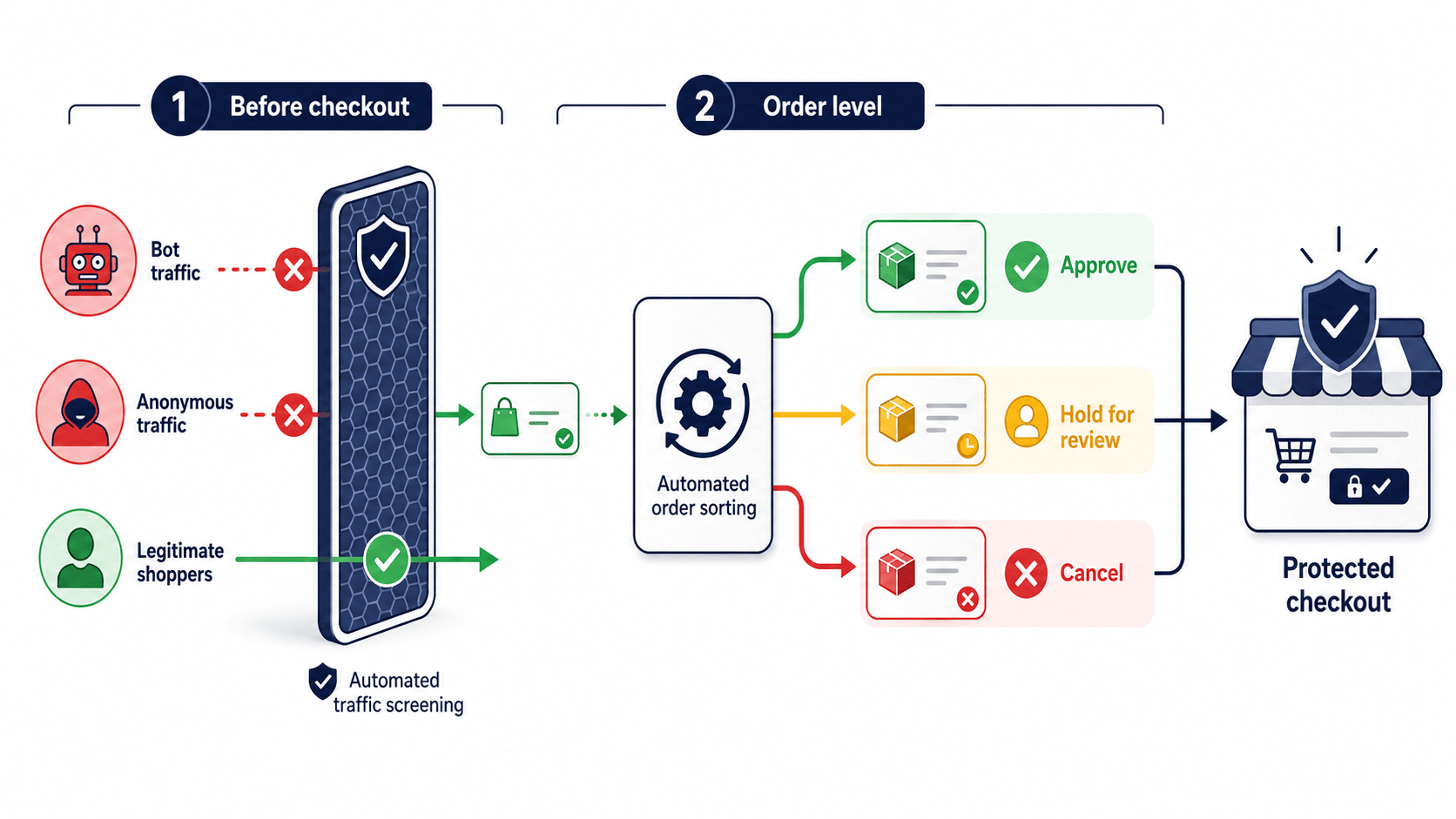
The most effective automation doesn't cancel fraud after the fact it prevents the order from ever being placed. This is the layer Shopify Flow can't reach, and where a dedicated app earns its place.
Instead of analyzing an order after creation, traffic-level automation evaluates each visitor in real time and blocks high-risk ones before they reach your payment page automatically, around the clock, based on rules you control.
This is exactly how an app like Browsify complements Flow. Browsify automatically blocks high-risk visitors, proxy/VPN/TOR traffic, and bot activity before checkout, based on a transparent risk score and thresholds you set with an iCloud Private Relay allow option so legitimate Apple users aren't caught in the net. It recognizes repeat offenders by persistent Visitor ID even when they rotate IPs, so the same bad actor stays blocked automatically. The result is a two-layer automated defense: Browsify stops bad traffic at the door, and Shopify Flow automates order-level decisions for everything that makes it through neither of which requires you to sit in the admin reviewing orders by hand.
Try Browsify free and automate fraud prevention before checkout, not just after. Browsify App
Frequently Asked Questions
Does Shopify automatically cancel high-risk orders? No. Shopify flags high-risk orders but doesn't cancel them that's still on you. You can automate cancellation with Shopify Flow templates or a dedicated app, but the platform itself only flags.
Why isn't my fraud workflow running? The two most common causes: using the "Order created" trigger instead of "Order risk analyzed" (so it runs before the risk verdict exists), or leaving automatic payment capture on when your workflow needs manual capture. Check both.
Is it safe to auto-cancel flagged orders? Be careful. "High risk" is a probability, not proof, so blanket auto-cancellation will catch some legitimate customers. The safer pattern is to auto-hold high-risk orders for review and reserve auto-cancel for confirmed-bad signals.
What's the difference between Flow automation and a fraud app? Flow automates order-level decisions after Shopify analyzes an order. A dedicated app like Browsify automates traffic-level prevention before checkout, blocking bad visitors so they never place the order. They work best together.
Final Thoughts
Automation is how fraud prevention scales but only if you automate with judgment. Let Shopify Flow handle the clear-cut order decisions (auto-capture the safe, hold the risky, cancel the confirmed-bad), get the trigger and manual-capture settings right, and never fall for blanket auto-cancellation that treats a probability as a certainty.
Then add the layer Flow can't reach: automated prevention that stops bad traffic before checkout. Combine the two and you get a defense that protects your store around the clock, scales with your growth, and keeps your hands off the order queue without slamming the door on the real customers who pay the bills.
Next in this series: "Shopify's Built-In Fraud Tools vs. Dedicated Apps: What You Actually Need."
This article is for general educational purposes and reflects common ecommerce fraud-prevention practices; it isn't legal or financial advice. Always confirm current Shopify features and your payment processor's policies, as they change over time.