
How to Stop Content Scraping and Protect Your Product Pages
Competitors and bots scrape product images, descriptions, and prices every day. Here's what content scraping is, what you can realistically prevent, and how to protect your product pages without breaking the experience for real shoppers.
You spent hours photographing your products, writing descriptions that convert, and pricing your catalog just right. Then a competitor's store appears with your exact images, your copy, and your prices undercut by a dollar. That's content scraping and for online stores, it's one of the most common and least-talked-about threats.
After 15+ years in store security, here's the honest framing I give every merchant: you can make scraping harder and more annoying, and you can deter casual copycats but no client-side trick makes your public pages truly un-copyable. The goal is realistic protection that raises the cost for scrapers and stops the easy stuff, without harming your real customers. This guide explains what scraping is, what's actually being taken, what works, and where the limits honestly are.
What Is Content Scraping?
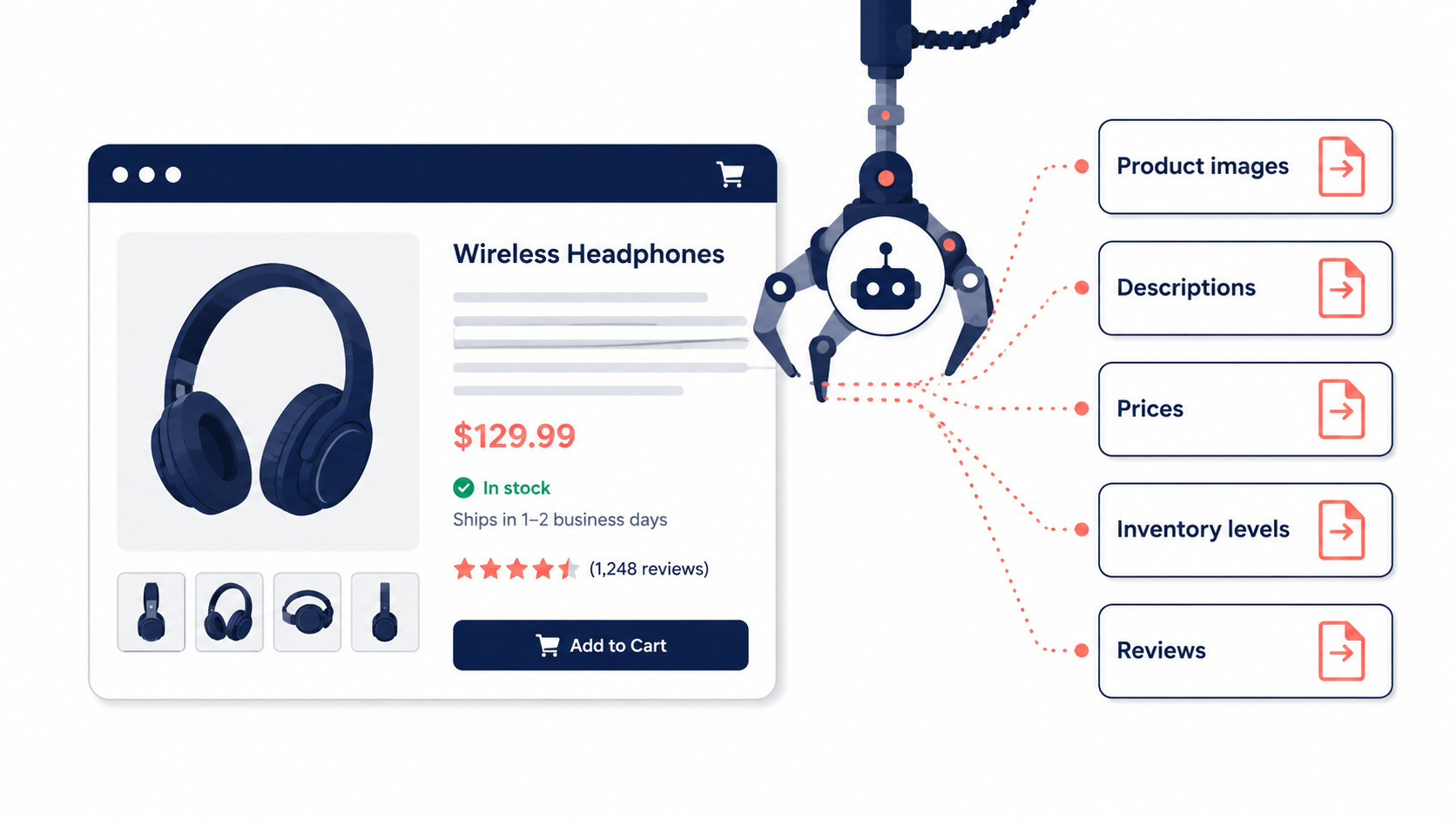
Content scraping is the automated extraction of data from your website usually by bots that crawl your pages and copy whatever's publicly visible. On a product page, that means your product titles, descriptions, hero images, pricing, inventory levels, and customer reviews.
This isn't a fringe problem. Automated bot traffic now makes up a large and growing share of all web activity, and a disproportionate amount of it targets e-commerce catalogs specifically by some estimates roughly a tenth of all web traffic comes from scrapers. Your product pages are a prime target precisely because they're public, structured, and valuable.
Who's Scraping You, and Why
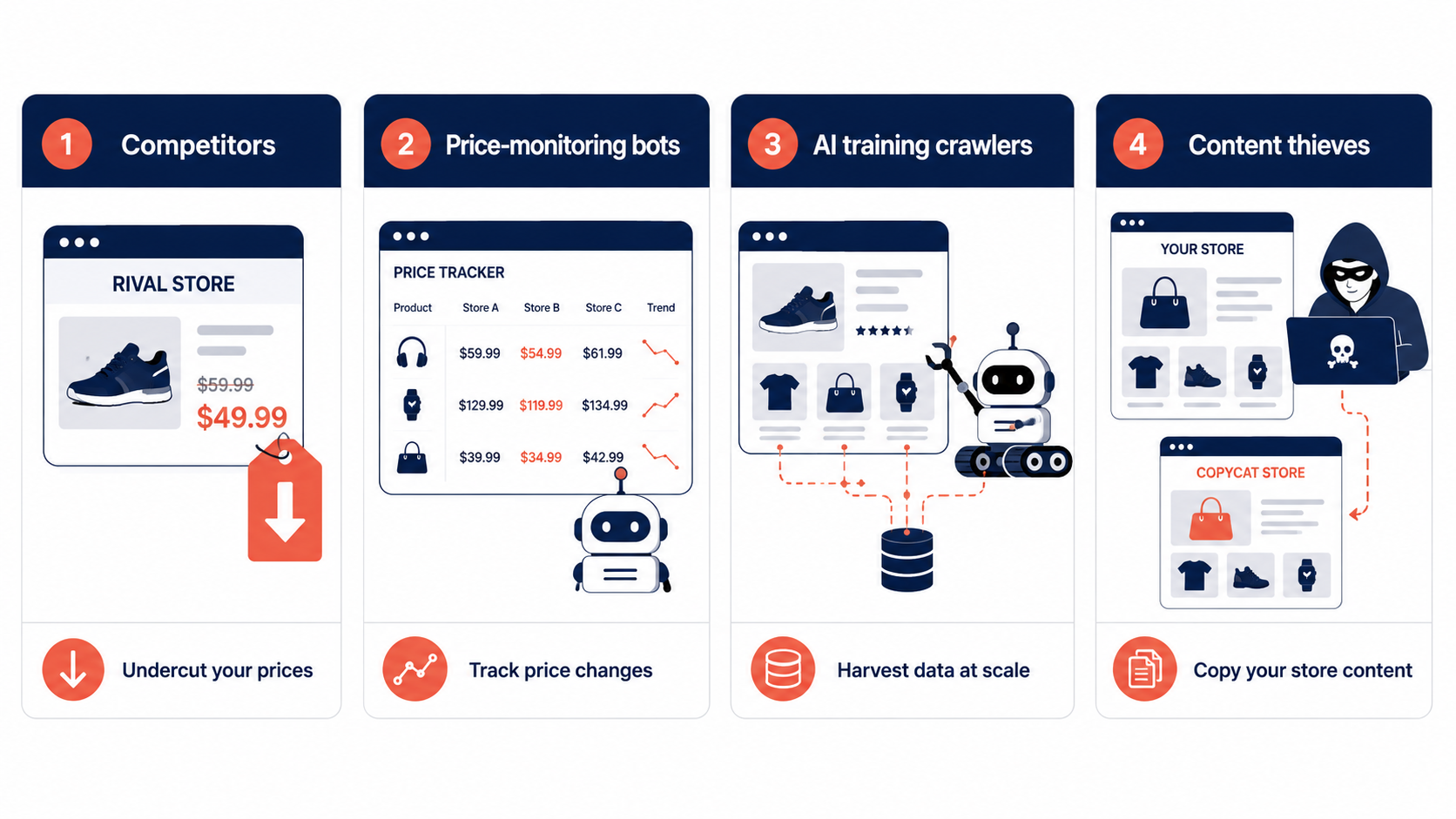
Not all scraping has the same motive. Understanding who's pulling your data tells you how much to care:
Competitors scrape your prices to undercut you in real time, and copy your images and descriptions to spin up rival listings without doing the work. This is the scraping that directly costs you sales.
Price-monitoring and aggregator bots pull your prices into comparison sites sometimes useful exposure, sometimes not.
AI training crawlers increasingly harvest product photos, copy, and reviews as training data for large language models. This category has exploded recently and is now a major source of catalog scraping.
Content thieves lift your images and copy wholesale to build counterfeit or copycat stores sometimes impersonating your brand outright.
The common thread: your most valuable, hardest-to-create content is exactly what's most worth stealing.
What You Can Realistically Protect and What You Can't
Let me be straight with you here, because over-promising on this topic is everywhere and it's misleading.
The hard truth: anything visible in a browser has, by definition, been sent to that browser which means a determined, technically capable scraper can ultimately get it. There is no client-side method that makes public content truly impossible to copy. Anyone who tells you otherwise is overselling.
The useful truth: the vast majority of scraping and content theft is casual a competitor right-clicking to save your image, someone dragging your description into their store, a basic bot grabbing low-hanging fruit. You absolutely can deter that layer, and doing so stops most of the everyday copying that actually affects small and mid-size stores.
So the right mental model isn't "make my content un-scrapable" (impossible). It's "raise the effort and friction enough that casual copycats give up and move on." That's an achievable, worthwhile goal.
Practical Ways to Protect Your Product Pages
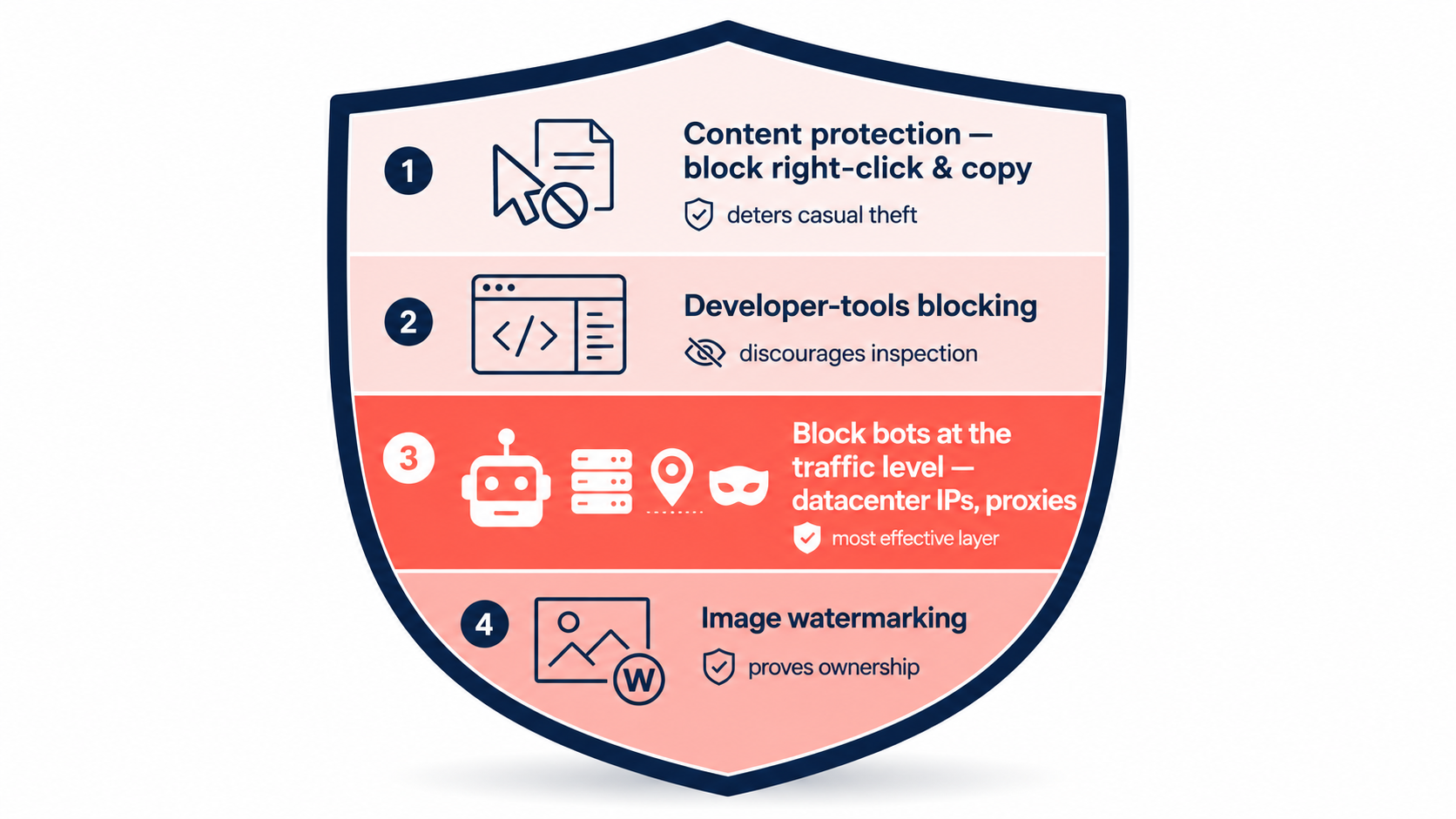
Here's the layered approach, from the simple deterrents to the more robust measures.
1. Block casual copying with content protection
The first layer targets the easy theft: disabling right-click (the "save image as" and "copy" menu), blocking common keyboard shortcuts (Ctrl+C to copy, Ctrl+S to save, Ctrl+U to view source), and disabling text selection on key content. None of this stops a determined scraper, but it absolutely stops the competitor who was about to right-click and save your product photo. For the casual layer which is most of the volume it's an effective, low-cost deterrent.
2. Discourage inspection with developer-tools protection
A step up: detecting and blocking developer tools (the F12 / inspect panel). When someone opens devtools to dig into your page structure, the protection can block the shortcut, warn, or hide content. Again, an advanced user can work around it but it raises the friction for anyone trying to inspect and systematically lift your page, and filters out a meaningful share of low-effort attempts.
3. Stop bots at the traffic layer
The most robust protection isn't on the page it's at the traffic level, stopping the automated bots before they ever render your content. This overlaps directly with the fraud signals covered elsewhere in this series: scrapers often arrive from datacenter IPs, proxies, and anonymized connections, and they behave differently from human visitors. Detecting and blocking that high-risk, automated traffic is the single most effective scraping defense available to a store, because it stops bots at scale rather than playing whack-a-mole on the page.
4. Protect your images specifically
Because images are the most-stolen asset, give them extra attention. Watermarking including invisible watermarking that embeds an imperceptible ownership signal in the pixels has become one of the more effective image defenses, since it survives compression and re-uploading and lets you prove ownership later. Visible watermarks deter casual lifting; invisible ones help you fight theft after the fact.
Don't break the experience for real shoppers
One important caution: content-protection measures touch every visitor, not just scrapers. Disabling right-click and copy can frustrate legitimate customers who want to copy a product name to search for reviews, or save an image to show a friend. Apply these protections thoughtfully protect what genuinely needs protecting, and don't make your store annoying to use. Deterrence shouldn't come at the cost of conversion.
Where a Tool Fits
Most of these protections aren't practical to hand-code and maintain on a Shopify store, so they typically come bundled in a store-security app. Browsify App includes content protection that can disable right-click, copy, and common keyboard shortcuts, plus developer-tools blocking on its higher tier and because it also scores and blocks high-risk automated traffic (datacenter IPs, proxies, bots) before it reaches your pages, it addresses both the casual-copying layer and the bot-scraping layer in one place. As always, the realistic aim is to deter the easy theft and stop the bots at scale, not to promise the impossible. (For the traffic-level signals behind bot detection, see our guides on IP addresses and proxy/VPN/TOR detection.)
Frequently Asked Questions
Can I completely stop my content from being scraped? No anything visible in a browser can ultimately be copied by a determined, skilled scraper. What you can do is deter the casual copying that makes up the bulk of the problem and block automated bots at the traffic level.
Does disabling right-click actually help? For casual theft, yes. It stops the common "right-click and save image" or "copy text" actions that competitors and casual copycats rely on. It won't stop a technical scraper, but it removes the easiest path.
Will content protection annoy my real customers? It can, if applied heavy-handedly disabling copy and right-click affects every visitor. Use it deliberately on the content that matters and avoid making normal browsing frustrating.
What's the most effective anti-scraping measure? Blocking automated bot traffic at the source datacenter IPs, proxies, and anonymized connections because it stops scrapers at scale rather than trying to protect each page element individually.
How do I protect my product images specifically? Combine deterrents (disabled right-click) with watermarking. Invisible watermarks are especially useful because they survive being copied and re-uploaded, helping you prove ownership and pursue theft after the fact.
Final Thoughts
Content scraping is real, common, and growing competitors want your prices, copycats want your images and copy, and AI crawlers want everything. But the way to think about defense isn't a fantasy of un-copyable pages. It's layered, realistic deterrence: block the casual copying with content protection, discourage inspection with developer-tools blocking, and most powerfully stop the automated bots at the traffic level before they ever reach your content.
Do that, and you raise the cost of stealing from your store enough that the casual copycats move on and the bots get filtered out all while keeping the experience smooth for the real customers you built those pages for.
This article is for general educational purposes and reflects common e-commerce security practices; it isn't legal or financial advice. Client-side protections deter casual copying but cannot fully prevent determined scraping for content-theft disputes or counterfeit issues, consult qualified counsel.
Related Guides
- Anti-Scraping How to stop bots from copying your product images, descriptions, and prices.
- Content Protection Block right-click, copy, and developer tools to deter casual content theft.
- Bot Protection Stop the automated scraper traffic at the source, before it reaches your pages.
- VPN & Proxy Blocking Block the anonymized connections scrapers hide behind.