
Proxy, VPN, and TOR: How Fraudsters Hide and How to Block Them
Fraudsters use proxies, VPNs, and TOR to mask their real location and slip past your defenses. Learn how each one works, why they signal risk, and how to block them without blocking real customers.
When a fraudster targets your Shopify store, the first thing they hide is where they really are. A stolen card from one country, an order shipping to another, and an IP address that says they're somewhere else entirely the geography doesn't add up because it's deliberately faked. The tools that make this possible are proxies, VPNs, and TOR.
Understanding these three technologies is one of the highest-leverage things a merchant can do, because location and anonymity signals are among the strongest predictors of fraud. But there's a catch: plenty of legitimate customers use these same tools for privacy. Block clumsily and you lose real sales; ignore them and you invite fraud. The skill is in telling the difference.
This guide explains how each tool works, why it raises a red flag, and how to block the bad traffic without turning away good customers. (For the wider strategy, see our complete guide to Shopify fraud prevention.)
Why Hiding Their Location Helps Fraudsters
Before the tools, the motive. Masking an IP address lets a fraudster:
- Bypass location-based blocks appearing to come from an allowed country when they're really in a high-risk one.
- Hide a mismatch disguising that the card's country, the shipping country, and their real location don't line up.
- Evade simple IP bans switching to a fresh IP the moment one gets blocked.
- Run bots at scale rotating through thousands of IPs so automated attacks like card testing don't trip rate limits.
In short, anonymity is the fraudster's camouflage. Detecting it strips that camouflage away which is exactly why it matters so much.
Proxy, VPN, and TOR: What's the Difference?
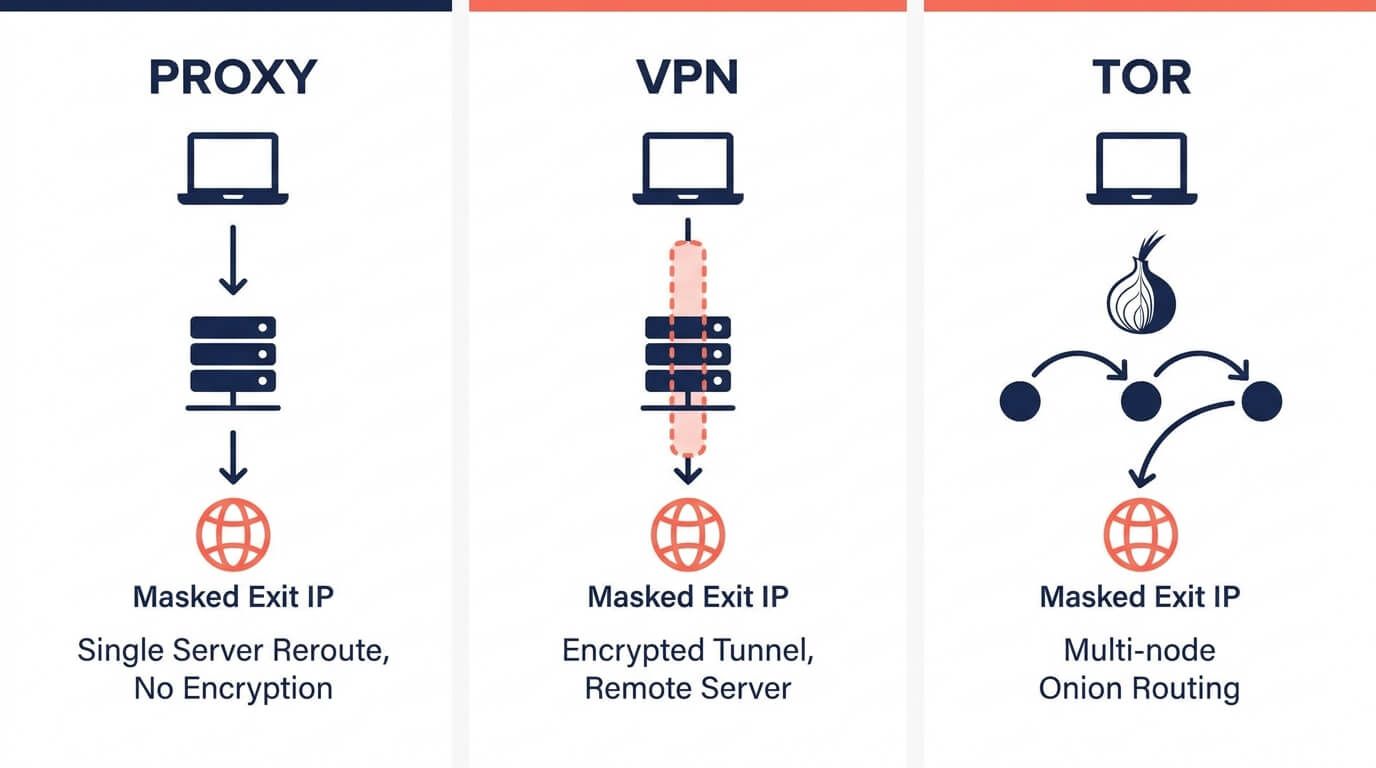
These three terms get used interchangeably, but they work differently and carry different levels of risk. Here's the plain-English breakdown.
Proxy
A proxy server acts as an intermediary between the user's device and the internet. Traffic routes through the proxy, which assigns a different IP address hiding the user's real one. A shopper in the US could appear to be browsing from Germany.
There are two important sub-types:
- Datacenter proxies use IPs from commercial hosting providers. They're cheaper, more common, and easier to detect because the IP traces back to a known data center.
- Residential proxies route traffic through real home internet connections affiliated with a genuine ISP. These are far harder to detect because the traffic looks like an ordinary household. Criminals favor them precisely because they blend in and the networks are often built from compromised devices whose owners don't even know their IP is being used.
VPN (Virtual Private Network)
A VPN encrypts the user's connection and routes it through a server in another location, masking their real IP and location. VPNs are extremely common roughly a third of internet users worldwide have used one and most usage is perfectly legitimate: privacy, security on public Wi-Fi, or accessing content while travelling. That dual-use nature is exactly why a VPN alone shouldn't auto-condemn an order.
TOR (The Onion Router)
TOR routes traffic through multiple volunteer-operated nodes, encrypting it at each layer, making the origin extremely difficult to trace. The connection appears to come from a random TOR exit node that could be anywhere in the world.
TOR is less common in everyday ecommerce fraud because it's slow, but it represents a more sophisticated threat and for a typical store, legitimate TOR shoppers are rare. One useful detail: the TOR Project publishes its list of exit-node IPs (updated frequently), which makes TOR exit nodes comparatively straightforward to detect and a reasonable candidate for stricter treatment.
How These Tools Are Detected
You don't need to build detection yourself, but knowing how it works helps you trust (and tune) it. Detection generally combines a few layers:
IP intelligence databases. Commercial databases maintain constantly updated catalogs of known VPN, proxy, and TOR IP addresses, compiled by scanning for open proxy ports, analyzing routing data, identifying datacenter address ranges, and incorporating abuse reports.
Device fingerprinting and network analysis. Because residential proxies can defeat simple IP lookups, modern detection also analyzes device characteristics and connection-level signals to spot the anomalies that obfuscation leaves behind.
Threat reputation. Beyond "is this a proxy?", good detection asks "has this IP recently been tied to botnets, spam, or confirmed abuse?" turning a binary flag into a richer risk signal.
The output is usually a confidence signal for example, this IP is a proxy with high confidence, recently seen, and previously associated with abuse which feeds into your overall risk score rather than acting alone.
The Big Mistake: Blocking Everyone Who Uses a VPN
Here's where many well-meaning merchants shoot themselves in the foot. They discover proxy/VPN detection, flip it to "block all," and quietly start losing legitimate customers the privacy-conscious shopper, the traveler on hotel Wi-Fi, the customer whose ISP routes through a flagged range.
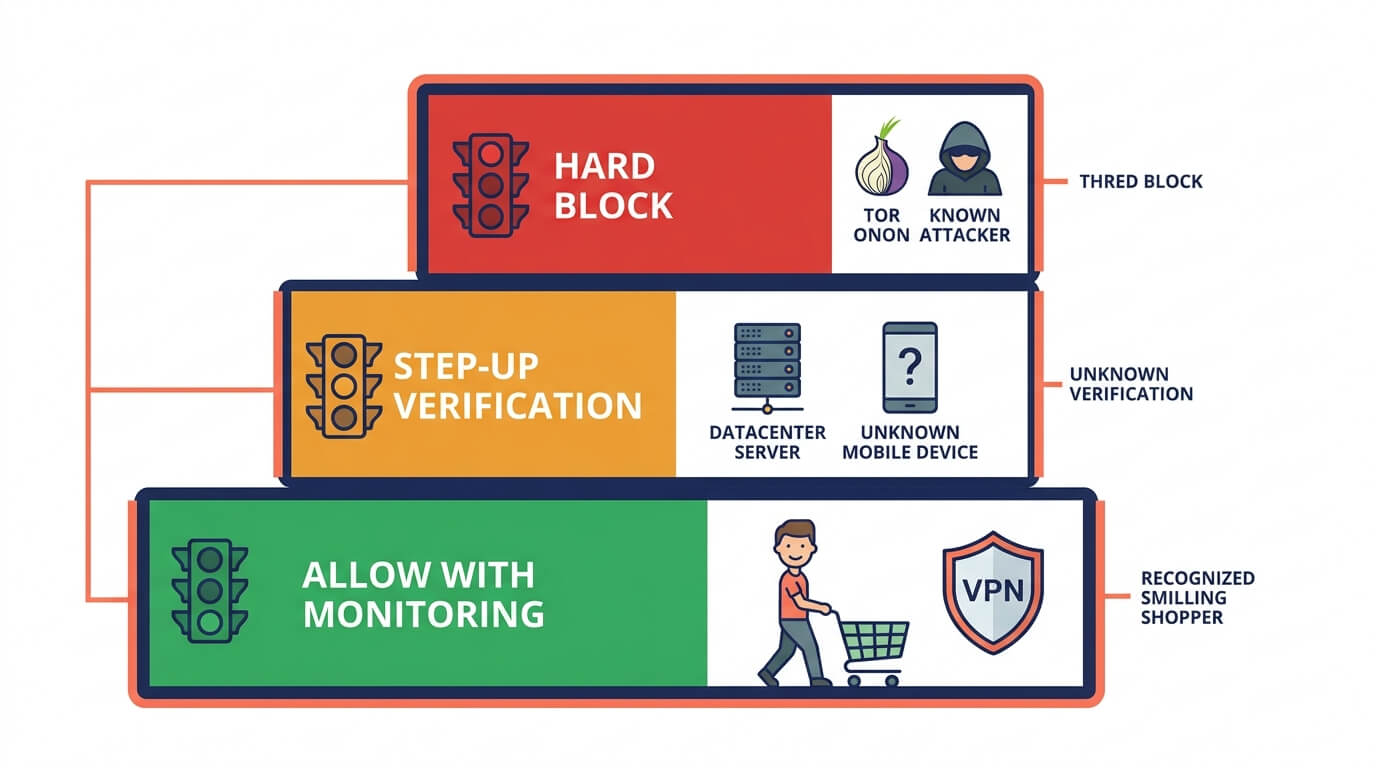
The fix isn't binary block-or-allow; it's graduated response. Match the strictness to the actual risk:
- Hard blocks make sense for the highest-risk, lowest-legitimate-use cases TOR exit nodes, known botnet IPs, and IPs with confirmed recent abuse.
- Step-up verification or review fits the middle ground datacenter proxies, VPN connections from unrecognized devices, or residential proxies with high probability scores.
- Allow with monitoring suits low-risk cases a recognized customer on a VPN doing something ordinary.
In other words, the anonymizing signal should feed your risk engine, not be the entire decision. A VPN combined with a card-country mismatch and bot-like behavior is a very different story from a VPN on its own.
Don't forget iCloud Private Relay
Apple's iCloud Private Relay masks IP addresses for millions of ordinary Apple users and it can look like a proxy to naive detection. Blocking it means turning away a huge segment of perfectly legitimate shoppers. Any sensible setup should explicitly allow iCloud Private Relay traffic so you don't punish real customers for using a built-in privacy feature.
How to Block Anonymized Fraud Traffic on Shopify
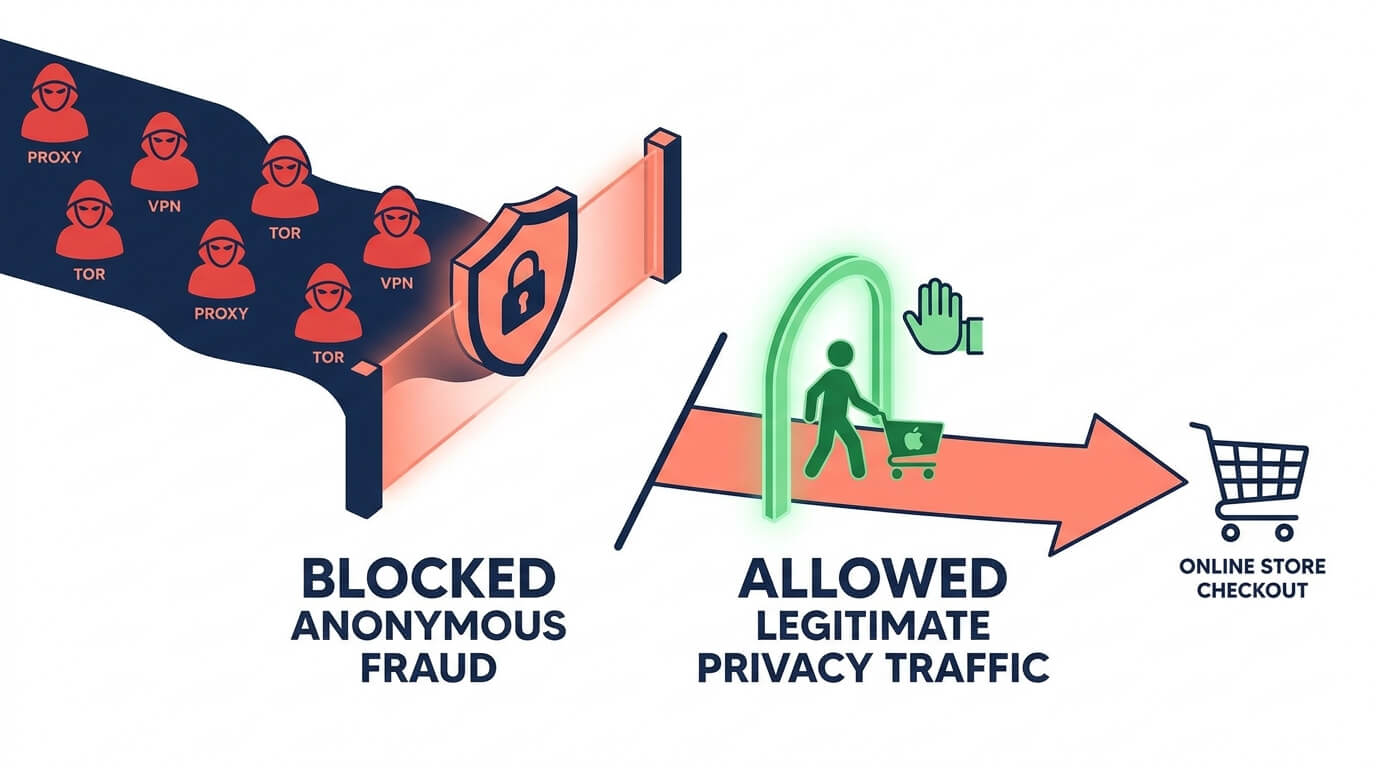
Putting it together, here's the practical approach for a Shopify store:
1. Detect, don't guess. Use a tool that identifies proxy, VPN, and TOR connections in real time and tells you the type and confidence, so a high-confidence residential proxy with abuse history is treated differently from a common VPN.
2. Block at the front door. The most effective place to stop anonymized fraud is before checkout denying high-risk anonymous sessions access rather than cleaning up flagged orders afterward. Prevention beats post-mortem review every time.
3. Use graduated rules. Reserve hard blocks for TOR and confirmed-abuse IPs; apply review or verification to ambiguous proxies/VPNs; allow low-risk privacy traffic through.
4. Always whitelist iCloud Private Relay to protect genuine Apple users.
5. Combine with other signals. Treat anonymization as one input to a broader risk score alongside location mismatch, device anomalies, and behavior never as a lone verdict.
This is exactly the layer where an app like Browsify fits. Browsify detects and drops anonymous sessions routing through proxies, commercial VPNs, and TOR nodes, folds that signal into a transparent visitor risk score, and lets you block high-risk anonymous traffic before it reaches checkout while the built-in iCloud Private Relay allow toggle keeps genuine Apple customers flowing through. Instead of choosing between "block all VPNs and lose sales" or "allow everything and invite fraud," you get the graduated, signal-rich approach this whole guide argues for.
Try Browsify free and block anonymized fraud traffic without blocking real customers. Browsify App
Frequently Asked Questions
Should I block every VPN user? No. Roughly a third of internet users use VPNs, mostly for legitimate privacy. Blocking all of them turns away real customers. Use VPN detection as one risk signal and reserve hard blocks for higher-risk cases like TOR or confirmed-abuse IPs.
Why are residential proxies so hard to detect? They route traffic through real home IP addresses tied to genuine ISPs, so the connection looks like an ordinary household. Detecting them requires more than a simple IP lookup device fingerprinting and reputation data help.
Is TOR traffic always fraudulent? Not always, but legitimate TOR shoppers are rare for a typical store, and TOR is favored for anonymous abuse. Because exit-node lists are published, TOR is also easy to detect making it a reasonable candidate for stricter treatment.
What is iCloud Private Relay and why does it matter? It's Apple's privacy feature that masks IP addresses for millions of ordinary users. It can resemble a proxy, so you should explicitly allow it to avoid blocking legitimate Apple customers.
Final Thoughts
Proxies, VPNs, and TOR are the fraudster's camouflage but they're also tools millions of honest shoppers rely on. The merchants who handle this well don't treat anonymization as an on/off switch. They detect the type and confidence of the masking, weigh it alongside other signals, reserve hard blocks for the genuinely high-risk cases, and explicitly protect legitimate privacy traffic like iCloud Private Relay.
Get that balance right and you strip away the fraudster's cover while leaving your real customers' experience untouched which is the whole game.
Next in this series: "Browser Fingerprinting and Visitor ID: Tracking Repeat Offenders" and "Best Practices for Setting Fraud Thresholds to Avoid False Declines."
This article is for general educational purposes and reflects common ecommerce fraud-prevention practices; it isn't legal or financial advice. Always confirm current Shopify features and your payment processor's policies, as they change over time.