
How to Automate Fraud Prevention on Shopify (Without Blocking Real Customers)
Manual fraud review doesn't scale but careless automation blocks good customers. Here's how to automate fraud prevention on Shopify the right way: catch the obvious threats, escalate the gray area, and keep checkout smooth for real shoppers.
Reviewing every flagged order by hand works fine when you're getting ten orders a day. At a hundred, it's a grind. At a thousand, it's impossible and orders ship before you ever look at them. So at some point every growing Shopify store faces the same question: how do I automate fraud decisions without accidentally cancelling orders from real customers?
After 15+ years in fraud prevention, I'll tell you the trap up front: the biggest risk in automation isn't missing fraud it's over-blocking. A clumsy auto-cancel rule can quietly reject legitimate buyers by the dozen, and you won't even see the revenue you lost. The good news is that done right, automation actually reduces false declines while saving you hours. This guide shows you how to automate the obvious cases, escalate the ambiguous ones, and keep your real customers flowing through.
Why Automate at All?
Manual review has three problems that get worse with scale: it's slow (orders ship before you review them), it's inconsistent (your judgment at 9am differs from 11pm), and it doesn't scale (you can't personally inspect a thousand orders). Automation fixes all three if you automate the right decisions.
The key insight is that not every order needs the same treatment. Most orders are obviously fine. A small slice is obviously fraudulent. And a band in the middle is genuinely ambiguous. Smart automation handles the two obvious ends automatically and routes only the ambiguous middle to a human. That's the entire philosophy.
The Golden Rule: Graduated Response, Not a Single Switch
The number one mistake is treating automation as one blunt rule "cancel everything risky." That's exactly what blocks good customers, because "risky" includes plenty of legitimate buyers who tripped a filter (traveling, on a VPN, first big order).
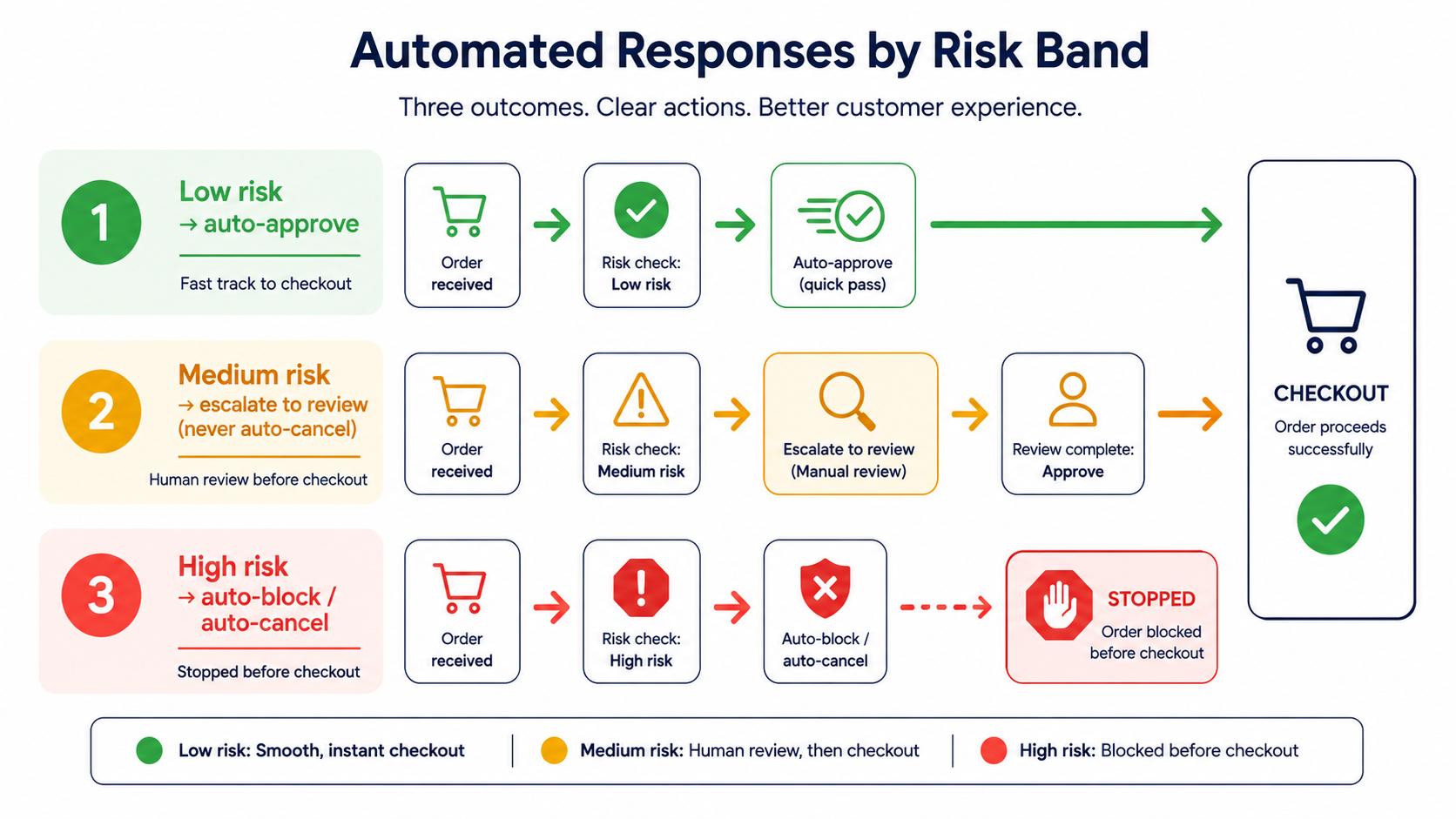
Instead, tie your automation to risk bands and give each band a different automated action:
- Low risk → auto-approve. The safe majority sails through. Fast checkout, no friction. This is most of your orders.
- High risk → auto-block or auto-cancel. The clearly fraudulent cases stacked red flags, known-bad signals get stopped automatically. No human time wasted on the obvious.
- Medium risk → escalate, don't cancel. This is the critical one. Ambiguous orders should be held for review, sent a verification step, or flagged never auto-cancelled. The middle band is where false declines hide, so you automate a closer look, not a rejection.
This graduated approach is what lets you automate aggressively at the safe and dangerous ends while protecting the customers in the uncertain middle.
What You Can Automate on Shopify
Shopify gives you native automation through Shopify Flow (on plans that include it), which lets you build workflows that automatically flag, hold, or cancel orders matching conditions you set. Common patterns:
- Auto-capture payment for low and medium-risk orders, hold high-risk ones for review.
- Cancel and restock high-risk orders, returning items to inventory and notifying the customer.
- Cancel orders from email addresses tied to past fraud.
- Cap orders per customer (e.g., cancel if someone places more than five in a day a card-testing signal).
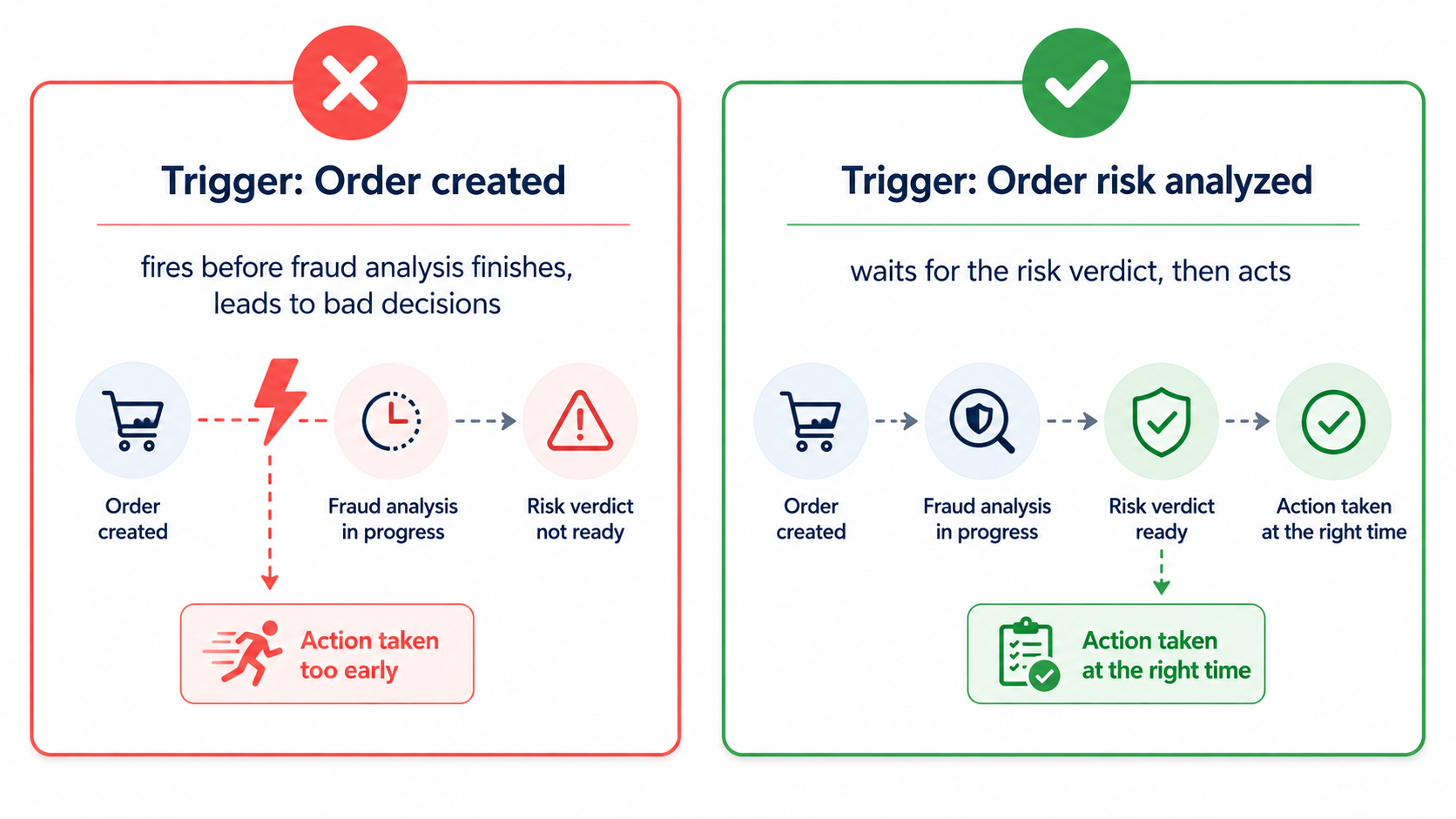
One crucial technical detail: when building these workflows, trigger them on "Order risk analyzed," not "Order created." Shopify's fraud analysis takes a moment to run after an order is placed, so triggering on creation means you're acting before the risk verdict exists. This single setting mistake is a common cause of bad automated decisions.
The Pre-Checkout Advantage
Here's where automation gets genuinely powerful and where it goes beyond what order-level rules can do. The cleanest fraud automation doesn't cancel a bad order after it's placed; it stops the bad visitor before they place it.
If automation blocks a high-risk visitor at the traffic level a datacenter IP, a known repeat offender's Visitor ID, an obvious bot then no fraudulent order is ever created. There's nothing to cancel, no chargeback to fight, no dispute ratio impact, and (for dropshippers) no supplier payment at risk. Pre-checkout automation is structurally cleaner than post-checkout cancellation, because it prevents the problem instead of cleaning it up.
The same graduated logic applies: block the clearly bad traffic automatically, let the clearly good traffic through, and let your risk score decide the middle.
How to Automate Without Blocking Real Customers
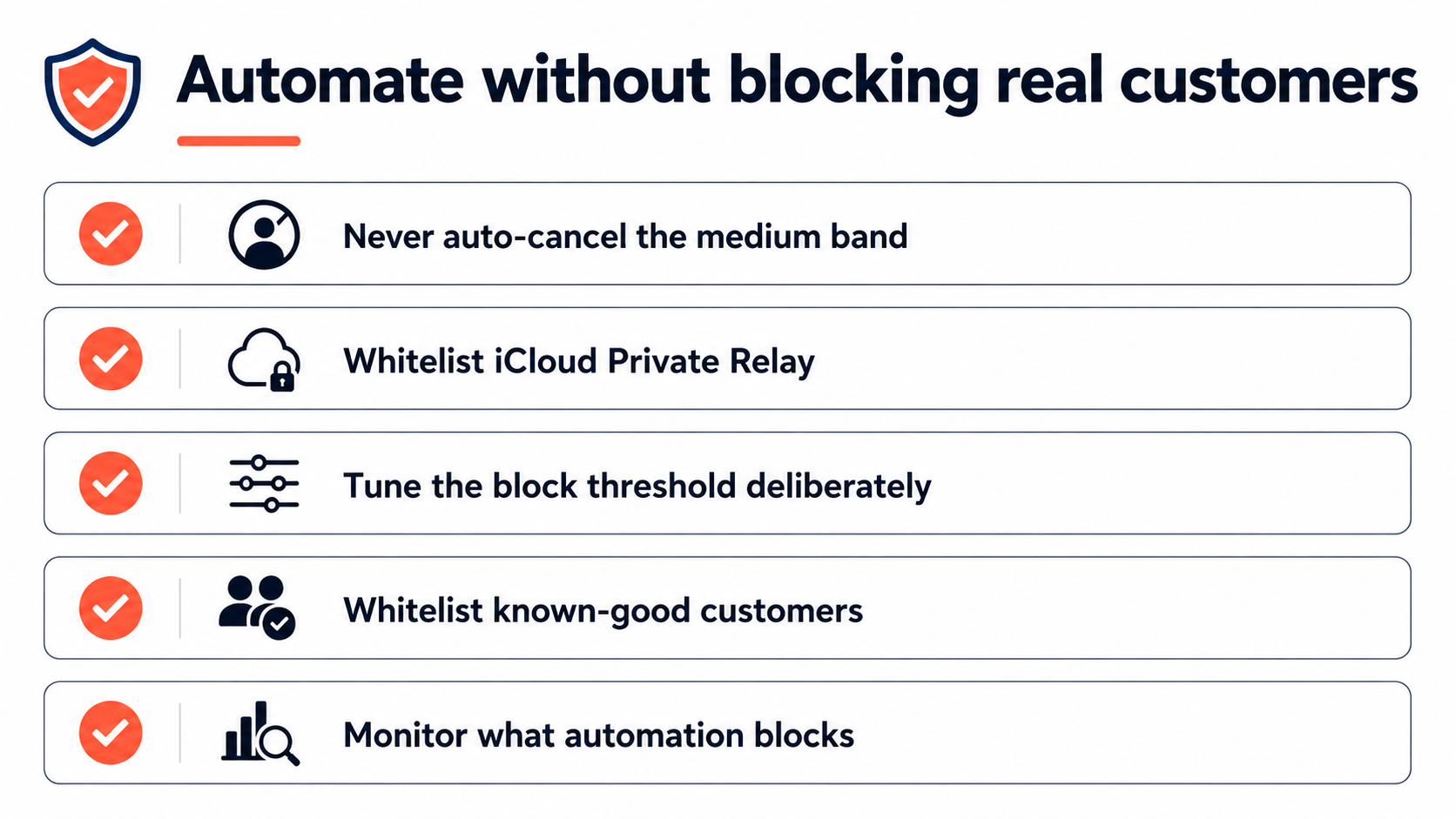
This is the part that matters most. Five practices keep automation from costing you good orders:
1. Never auto-cancel the medium band. Route ambiguous orders to review or verification, not rejection. Reserve auto-cancel for genuinely high-risk cases only.
2. Whitelist legitimate privacy tools. Make sure your automation allows iCloud Private Relay and similar mainstream privacy services. A rule that auto-blocks "datacenter-like" traffic can silently cancel real Apple customers one of the most common automation own-goals.
3. Tune your block threshold deliberately. Don't set auto-block at a hair-trigger. If your tool auto-blocks only at the very top of the risk scale, lower it thoughtfully (toward a high-but-not-maximum level) so you catch real threats without sweeping up borderline-good orders. Test, watch your results, adjust.
4. Whitelist your known-good customers. Returning customers and recognized devices (via Visitor ID) can be exempted so a loyal buyer never gets caught by a rule meant for strangers.
5. Monitor what your automation is doing. Periodically review what got auto-blocked and auto-cancelled. If you spot legitimate orders in there, your rules are too aggressive loosen them. Automation isn't "set and forget"; it's "set, watch, refine."
The throughline: automate confidently at the extremes, keep a human in the loop for the middle, and always leave a door open for the legitimate customer who looks unusual.
Where Browsify Fits
Building and maintaining all of this by hand is a lot which is why automation usually lives in your security tooling. Browsify App automates fraud prevention on the pre-checkout side: it auto-blocks high-risk visitors and orders based on their risk score, with Block Automation on its top tier for hands-off handling while keeping the graduated logic that protects real customers. You set the auto-block threshold (its default sits at the top of the scale, but lowering it toward 80 catches more genuine threats), the ambiguous middle can be flagged rather than killed, and an iCloud Private Relay allowance is built in so privacy-minded Apple shoppers aren't auto-blocked by mistake. It works alongside Shopify Flow, not against it Flow handles your order-level workflows, Browsify handles the visitor-level blocking before checkout.
There's a free tier to start automating country and visitor-ID blocking and watch how it performs on your real traffic before scaling up. Install Browsify free →
New to how the risk score drives these decisions? Start with Understanding Risk Scores: How Fraud Detection Actually Works and Best Practices for Setting Fraud Thresholds to Avoid False Declines.
Frequently Asked Questions
Will automating fraud prevention block my real customers? Only if you automate carelessly. The safe approach auto-blocks only clearly high-risk cases, auto-approves the safe majority, and routes the ambiguous middle to review rather than cancellation. Done that way, automation reduces false declines rather than causing them.
Should I auto-cancel all high-risk orders? Auto-cancel only genuinely high-risk orders with stacked signals. Medium-risk orders include many legitimate customers, so escalate those to review or verification instead of cancelling them.
Why trigger Shopify Flow on "Order risk analyzed" instead of "Order created"? Because Shopify's fraud analysis runs a moment after an order is created. Triggering on creation means your automation acts before the risk verdict exists, leading to bad decisions.
How do I keep automation from blocking Apple customers? Whitelist iCloud Private Relay. It routes Safari traffic through Apple's network and can look like a proxy to naive rules a frequent cause of auto-blocking legitimate buyers.
Is pre-checkout automation better than auto-cancelling orders? It's structurally cleaner: blocking a bad visitor before they order means no chargeback, no dispute-ratio hit, and for dropshippers no supplier payment at risk. Post-checkout cancellation cleans up a problem that pre-checkout blocking prevents.
Final Thoughts
Automation is how fraud prevention scales but the goal isn't to hand every decision to a machine that cancels anything suspicious. It's to automate judgment: approve the obvious good, block the obvious bad, and keep a human on the genuinely ambiguous. Tie your actions to risk bands, trigger your workflows correctly, whitelist legitimate privacy tools and known-good customers, and watch what your rules actually do.
Get that balance right and automation gives you the best of both worlds hours saved, fraud stopped at scale, and real customers gliding through checkout without ever knowing a fraud system was watching. That's the whole point: invisible to the people you want, decisive against the ones you don't.
This article is for general educational purposes and reflects common e-commerce fraud-prevention practices; it isn't legal or financial advice. Shopify's automation features and any app's capabilities change over time always confirm current functionality and test rules against your own data before relying on them.
Related Guides
- Automatic Fraud Blocking Set up rules that protect your store 24/7 without manual review.
- Fraud Risk Scores How the risk score drives your automated approve, review, and block decisions.
- Stop Fake Orders on Shopify The complete guide to identifying and blocking fraudulent orders.
- VPN & Proxy Blocking Automatically block anonymized traffic before checkout.