
Proxy, VPN, and TOR: How Fraudsters Hide and How to Block Them
Fraudsters use proxies, VPNs, and TOR to mask their location and identity. Here's how each one works, why they're a fraud signal, and how to block the bad ones without losing real customers.
If you've spent any time looking at fraud signals, you've seen the warning: this visitor is using a proxy, a VPN, or TOR. These tools let someone hide their real IP address and by extension, their real location and identity. That's exactly why they show up so often around fraud.
But here's the nuance most guides skip: these same tools are used by millions of perfectly legitimate, privacy-conscious shoppers every day. After 15+ years in fraud prevention, I can tell you the merchants who get this right aren't the ones who block every anonymized visitor they're the ones who understand what each tool is, why it's a signal, and how to block the genuinely risky traffic without slamming the door on good customers.
This guide is the educational walkthrough: what proxies, VPNs, and TOR actually are, how fraudsters use them, why they're hard to catch, and the balanced way to handle them.
First, Why Hiding an IP Address Matters
As covered in What Is an IP Address and Why It Matters for Store Security, a visitor's IP reveals their approximate location, connection type, and reputation. For a fraudster using a stolen card, that's a problem because if your store sees an order from one country on a card issued in another, that mismatch is a classic red flag.
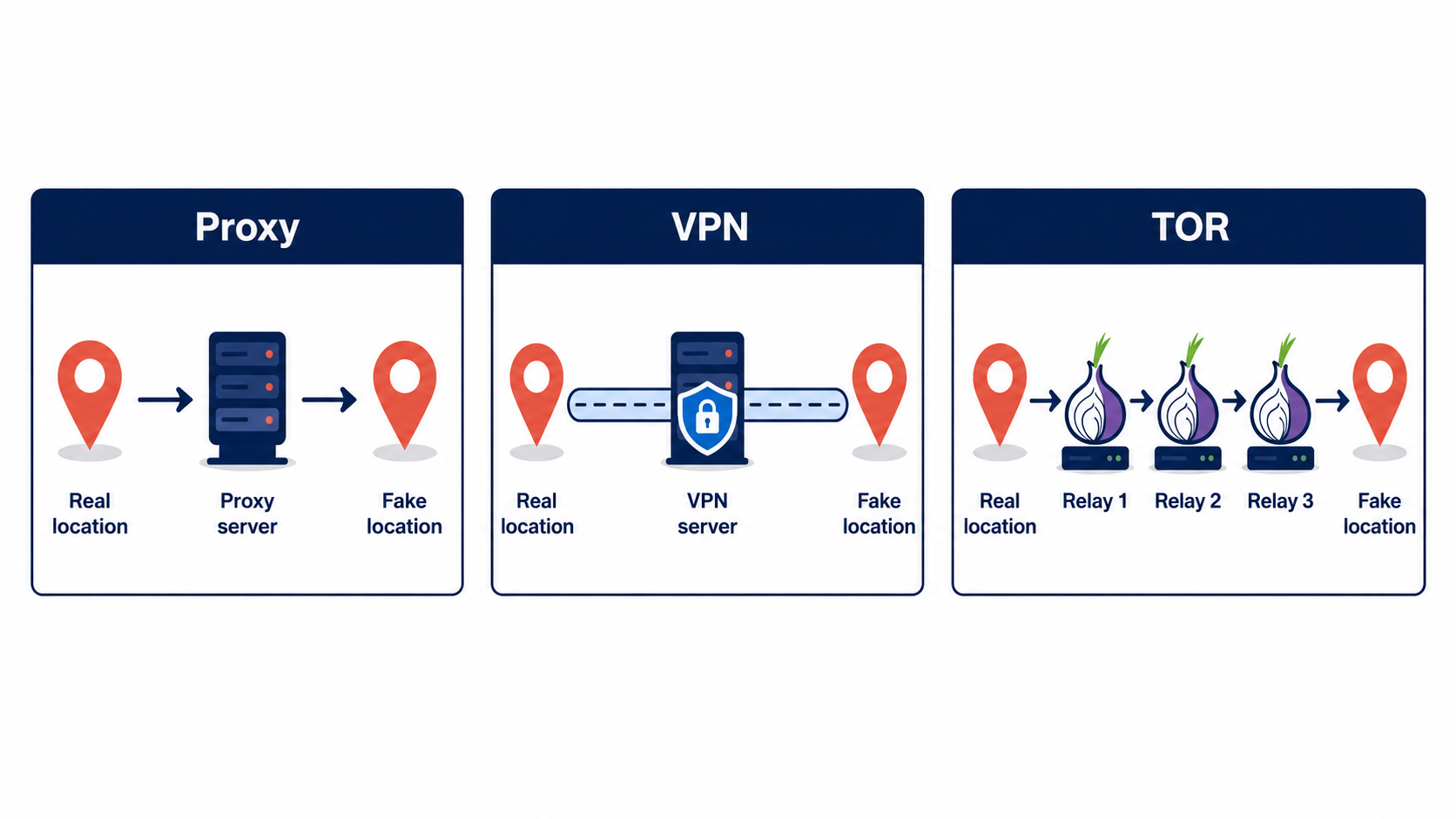
So fraudsters route their traffic through an intermediary server. Instead of your store seeing the fraudster's real IP, it sees the intermediary's. Done well, this lets an attacker in one country appear to be a local shopper in the victim's country neatly erasing one of the most reliable fraud signals you have. Proxies, VPNs, and TOR are the three main ways they do it.
Proxy: The Middleman Server
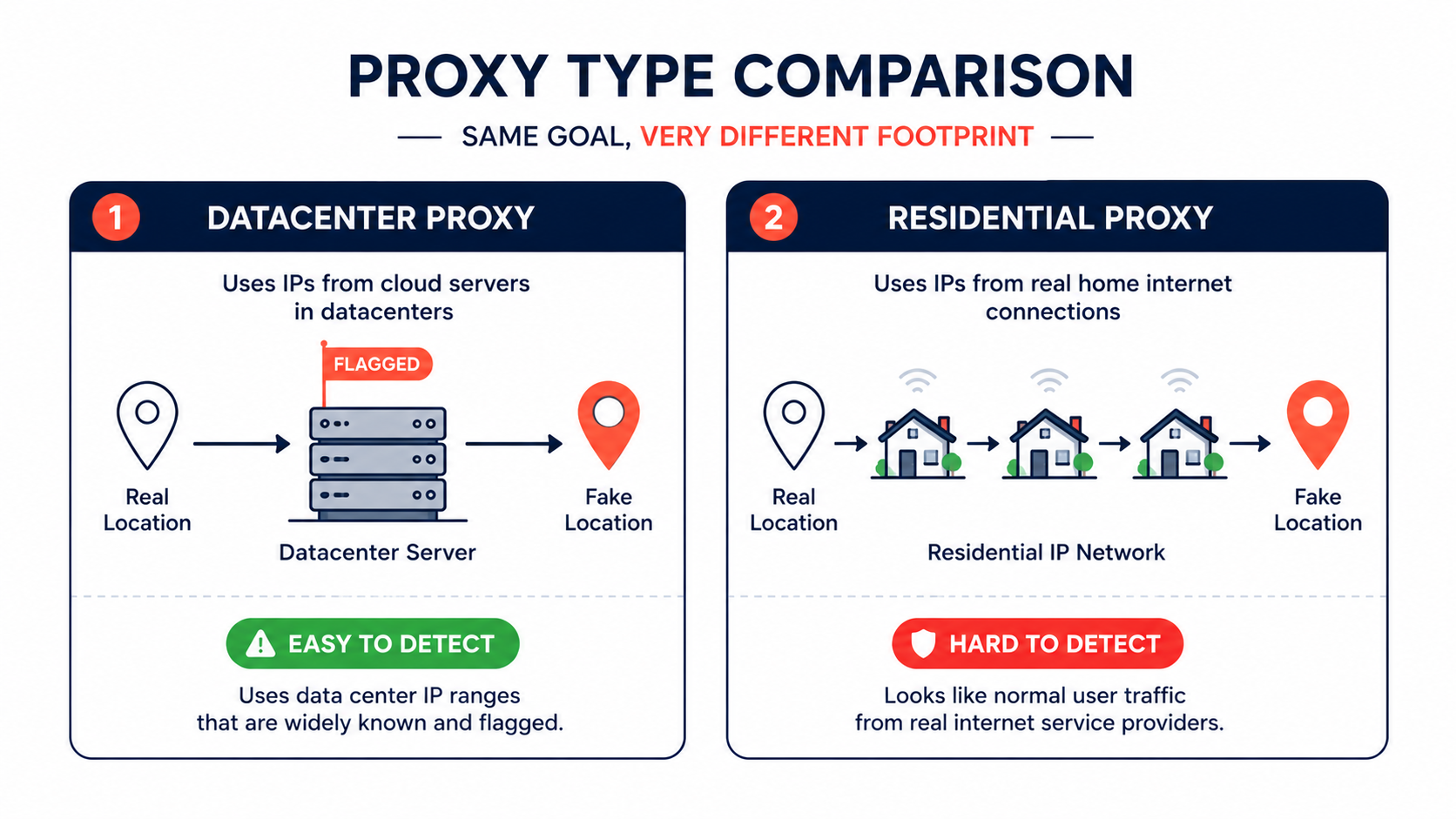
A proxy is a server that sits between a visitor and your store, forwarding requests on the visitor's behalf. Your store sees the proxy's IP, not the visitor's. Proxies come in two flavors that matter a lot for fraud:
Datacenter proxies run on commercial server infrastructure. They're cheap, fast, and easy to spot no real shopper browses from a server farm, so datacenter traffic is a strong, clean fraud signal.
Residential proxies are the dangerous ones. They route traffic through real home internet connections (often borrowed or compromised), so the fraudster's traffic looks exactly like an ordinary household visitor. This is the hardest category to detect, because the IP genuinely belongs to a residential ISP. Fraudsters deliberately use them to blend in for account takeovers, card testing, and stolen-card purchases.
Residential proxies are why "just block proxies" is no longer a complete answer the cheap ones are easy to catch, but the sophisticated ones are designed to look legitimate.
VPN: The Encrypted Tunnel
A VPN (Virtual Private Network) encrypts a user's connection and routes it through a server in a location of their choosing. Your store sees the VPN server's IP and location, not the user's real one. A fraudster can pick a VPN endpoint in the victim's home country so their order looks local.
But and this is the critical part VPNs are also mainstream consumer privacy tools now. Millions of ordinary people use a VPN on public Wi-Fi, to protect their browsing, or simply because their employer or device turns one on by default. A VPN is a yellow flag, not a red one. Treating every VPN user as a fraudster is one of the fastest ways to reject good customers.
TOR: Maximum Anonymity
TOR (The Onion Router) bounces a connection through multiple volunteer-run servers worldwide, encrypting it at each hop, so the exit point bears no obvious relationship to the origin. It's the strongest of the three for hiding identity.
TOR is the clearest signal of the bunch. While it has legitimate uses (journalists, activists, the deeply privacy-minded), the overwhelming majority of e-commerce shoppers have no reason to check out over TOR. For most stores, TOR traffic deserves much closer scrutiny or outright blocking than a VPN does. The risk-reward simply tilts differently than with mainstream VPNs.
Why These Are So Hard to Detect
If anonymized traffic were easy to spot, fraud would be easy to stop. It isn't, for a few reasons:
Residential proxies blend in. As above, they ride on legitimate ISP connections, so the IP itself looks clean.
The data changes constantly. Anonymization IP ranges are highly volatile industry data suggests a large share of "privacy IP" data changes every week, which means detection lists go stale fast and need frequent updates to stay accurate.
One signal isn't enough. A current IP reputation check can miss a fresh residential proxy entirely. Reliable detection combines several techniques IP reputation, timezone and DNS consistency checks, connection-type analysis, and device fingerprinting so that a visitor who looks local but whose other signals don't line up still gets flagged.
This is why anonymization detection is best understood as a contributing signal feeding a broader risk score, rather than a single on/off switch.
How to Block the Bad Without Losing the Good
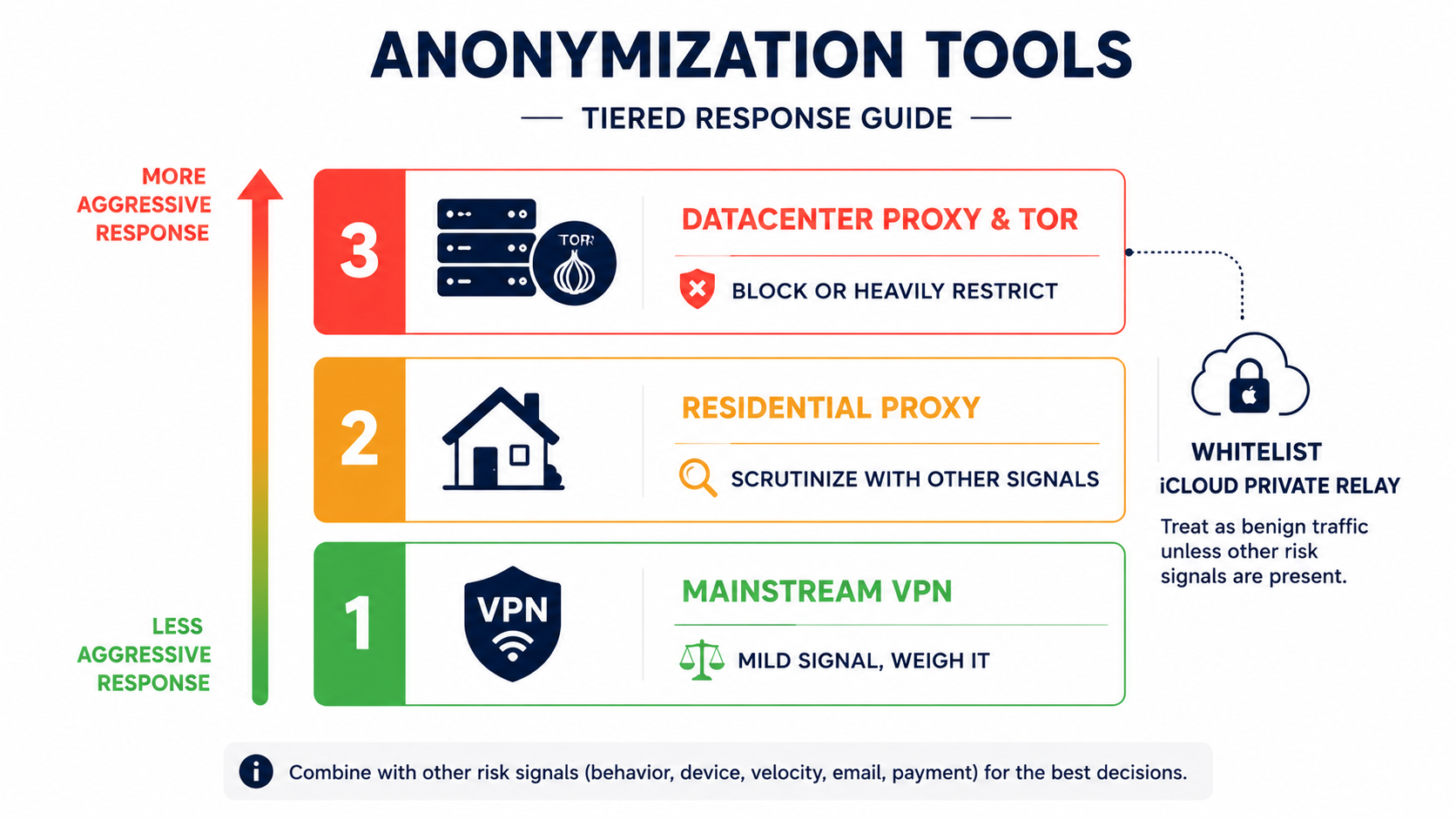
Here's the balanced playbook. The goal is never "block all anonymized traffic" it's "match your response to the actual risk."
Tier your response by tool. They're not equal. TOR and datacenter proxies justify aggressive handling. Residential proxies warrant scrutiny combined with other signals. Mainstream VPNs are a mild signal best weighed alongside the order's other details, not blocked outright.
Combine signals, don't rely on one. Pair anonymization detection with the order's payment data, the device fingerprint, and behavioral signals. A VPN plus a billing/shipping mismatch plus a failed card check is a very different story than a VPN alone.
Use a risk score, not a hard rule. Let anonymization raise an order's risk score rather than auto-rejecting it. This way an ambiguous signal gets balanced against everything else instead of triggering a costly false decline.
Whitelist legitimate privacy services especially iCloud Private Relay. This one deserves emphasis. Apple's iCloud Private Relay routes Safari traffic through Apple's infrastructure and can look like a proxy or datacenter connection to a naive fraud rule. The cost of getting this wrong is real: one documented case saw an 8–12% drop in iOS Safari conversion after a store tightened a "block datacenter IPs" rule that inadvertently caught Private Relay users. Because Apple assigns these IPs by region rather than city, a Private Relay visitor can trip both a "datacenter" flag and a "city mismatch" flag at once, pushing a composite score into the block zone even though they're a completely legitimate Apple customer. Always allow Private Relay and similar mainstream privacy services explicitly.
Where a Tool Fits
Manually checking every visitor's connection type is impossible at any real volume. This is where a dedicated layer helps. A store-security app like Browsify App detects proxy, VPN, and TOR connections automatically, lets you configure how each is handled, and feeds the result into a visitor risk score rather than a blunt all-or-nothing block with an iCloud Private Relay allowance built in so you don't accidentally turn away Apple users. The point isn't to block everything anonymized; it's to see the anonymization clearly and respond proportionally. (For how those scores combine many signals into one verdict, see Understanding Risk Scores: How Fraud Detection Actually Works.)
Frequently Asked Questions
Should I block all VPN traffic? No. VPNs are mainstream privacy tools used by millions of legitimate shoppers. Treat a VPN as a mild signal to weigh alongside the order's other details, not as proof of fraud.
Is TOR traffic always fraudulent? Not always TOR has legitimate privacy uses but very few ordinary shoppers check out over TOR, so it warrants much closer scrutiny than a VPN, and many stores reasonably block it.
What's the difference between a datacenter proxy and a residential proxy? A datacenter proxy runs on commercial servers and is easy to detect; a residential proxy routes through real home connections and is far harder to catch because the IP looks like an ordinary household.
Why do my legitimate Apple customers sometimes get flagged? Likely iCloud Private Relay, which routes Safari traffic through Apple's network and can resemble a proxy to naive rules. Whitelisting Private Relay prevents these false declines.
Can fraudsters fully hide with these tools? They can hide their IP, but not every signal. Device fingerprinting, payment data, and behavioral patterns can still expose them which is exactly why combining signals beats relying on IP alone.
Final Thoughts
Proxies, VPNs, and TOR all do the same basic job hide a visitor's real IP but they don't carry the same risk, and they shouldn't get the same response. Datacenter proxies and TOR are strong signals you can act on confidently. Residential proxies are the sophisticated threat that demands combined signals to catch. And mainstream VPNs and iCloud Private Relay are everyday privacy tools where over-blocking costs you real revenue.
The skill isn't blocking anonymized traffic it's reading it accurately and responding in proportion. Detect clearly, tier your response, combine your signals, and whitelist the legitimate privacy tools. Do that, and anonymization shifts from a blind spot into one more signal working in your favor.
This article is for general educational purposes and reflects common e-commerce security practices; it isn't legal or financial advice. Anonymization and detection techniques change rapidly always confirm the current behavior of any tool before relying on it.
Related Guides
- VPN & Proxy Blocking — How to block fraud traffic from anonymizing services without losing real customers.
- Bot Protection — Stop automated traffic that hides behind proxies and datacenters.
- Fraud Risk Scores — How anonymization combines with other signals into one risk verdict.
- Automatic Fraud Blocking — Set up rules that protect your store 24/7 without manual review.